
See Every Dollar Your Clusters Cost
OneLens gives you correlated cost and utilization data from cluster to workload — built on your actual cloud bill, not pricing estimates. Across EKS, AKS, and GKE.

Trusted by leading businesses




Full support for EKS and GKE
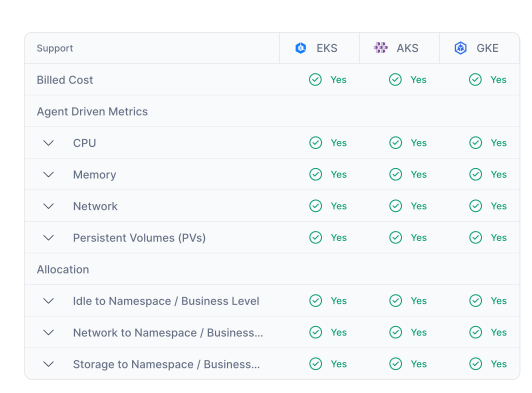
OneLens provides the same depth of Kubernetes cost visibility across all three major managed Kubernetes services — Amazon EKS and Google GKE. Each provider has different billing models, discount structures, and cost dimensions.
OneLens normalizes all of this into a consistent view, so your platform teams get the same experience regardless of which cloud a cluster runs on.
For multi-cloud organizations, this means one tool for all Kubernetes cost visibility — not a different approach per provider.
Costs built from your actual bill
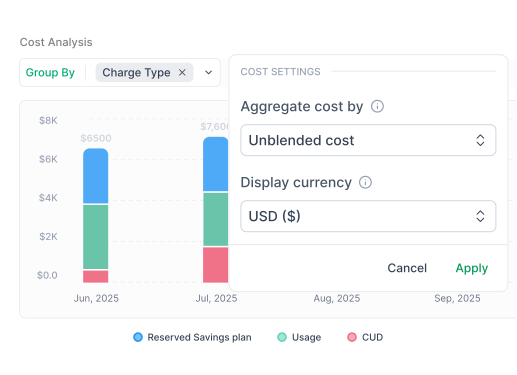
You can view costs as amortized (reflecting Savings Plans, Reserved Instances, CUDs, and other commitments) or as unblended (pure usage-driven costs, independent of commitment allocations).
Engineers often prefer the unblended view to understand actual consumption without commitment noise, while finance teams need the amortized view for accurate cost reporting. Both are available across all providers. The numbers each team needs are always there.
Cluster → NodePool → Instance Type → Workload
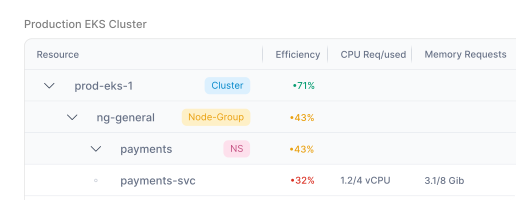
Navigate your cost data the way your infrastructure is actually structured. Start at the cluster level and drill into node pools,instance types, and individual workloads.
At every level, OneLens shows efficiency metrics, real utilization, actual cost, and last-utilized date — soyou can spot waste immediately without assembling data from multiple sources.
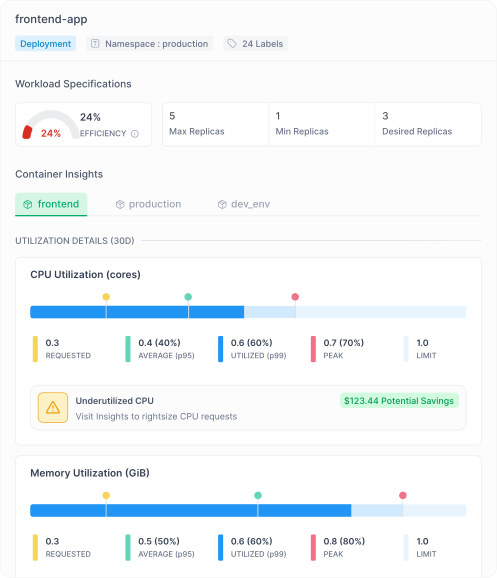
Workload efficiency at full resolution
For every workload, OneLens surfaces Min, Max, Average,P95, and P99 metrics for both CPU and Memory — clearly mapped against configured requests and limits.
You can study any workload at hourly granularity to understand behavior patterns, identify over-provisioning, and make confident rightsizing decisions.
Node pools as first-class citizens
Most cost tools treat node pools as an afterthought.
OneLens treats them as the foundation of your cost structure. See the actual behavior of each node pool — how instances are utilized, how workloads are distributed, and whether your configuration matches real-world usage. This is where the biggest optimization opportunities often hide.

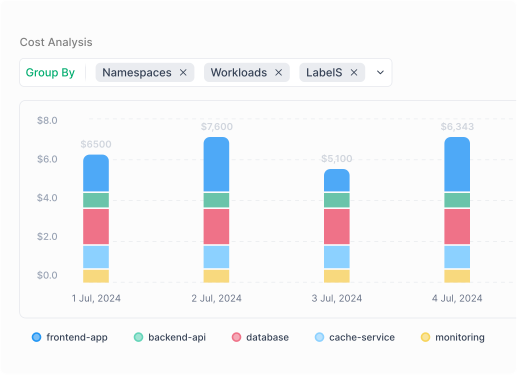
Deep cost exploration
Explore costs relationally using multi-level group-by across namespaces, node groups, and labels — at daily granularity.
Filter, pivot, and drill into the data to answer any cost question without exporting to a spreadsheet.
Built for the platform engineer who needs to understand cost behavior, not just review a summary.
Volume cost analysis
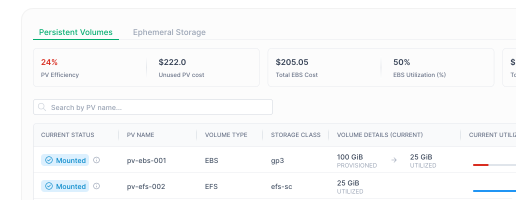
OneLens provides detailed analysis of Persistent Volumes —historical cost trends (critical for auto-scaling volumes), workload attachment status, and utilization levels. Underutilized and unattached volumes are clearly flagged, so you can reclaim wasted storage spend that's easy to miss in standard billing views.

$26K Saved in 30 Days: No More Ghost Nodes

OneLens automatically detected 4 orphaned EKS nodes running at less than 1% CPU — completely invisible to our team. We terminated them within a sprint and saved over $2,200/month. That's $26,000 a year we were just burning. The platform didn't just flag the issue, it gave us the evidence, the ticket, and the recommended action. Zero manual investigation needed
FAQ
OneLens brings costs of all your cloud costs across multi-cloud(AWS, Azure, GCP, OCI), Kubernetes (EKS, AKS, GKE), AI, and your custom sourcesat one place. OneLens allows you to allocatecosts and set budgets across all these sources to your businessconstructs such as Business Units, Applications, Projects, Environments,etc. Then, you can setup customworkflows which deliver precise, timely, and relevant cost alerts andanomalies to teams and individuals who are accountable. No Cloud Native toolgives you deep, unified Kubernetes cost visibility – across requests,limits, usage, and nodes at on place:OneLens does.
Our goal is to bring all your Cloud, AI, and Kubernetescosts at one place; make it super easy for respective teams to understand andoptimize costs.Our Kubernetes Cost Visibility, Workflow Engine, and DeepInsights (storage, networking, data transfer) module stands out, solving thehardest and most time consuming problems of engineering and devops teams.
Most customers see their first cost and optimizationinsights within 36 hours of connecting cloud accounts.
OneLens integrates directly with your clusters to break down costs by namespace, pod, deployment, service, and any custom labels you use. We calculate true cost including shared cluster resources (control plane, systempods), ingress/egress traffic, and persistent storage-then allocate everything based on actual resource consumption. For organizations with large Kubernetes spend, this transforms opaque infrastructure costs into team-level accountability.
OneLens works with all major Kubernetes distributions including Amazon EKS, Azure AKS, and Google GKE. Our integration is read-only and doesn't affect cluster performance or require changes to your work loads.
Native Cloud tools do not collect adequate data for you to understand Kubernetes costs. We deploy an agent to bring all all that data to generate required insights. You can learn all about it here. The cost is minimal and all details are here.
Yes. OneLens provides granular cost visibility at everylevel—cluster, namespace, deployment, pod, and even individual container. You can view costs by any Kubernetes label including team, application,environment, or customer ID. This enables precise cost allocation and chargeback for shared clusters.
OneLens gives you precise per-pod CPU/memory cost, which allows you to allocate costs by namespaces, workloads or labels as per your business requirements. Further, OneLens automatically distributes shared cluster costs (idle costs, network costs) across pods. This ensures fair cost distribution and budgeting.
No. OneLens works with your existing Kubernetes setup and doesn't require changes to your deployment patterns, namespaces, or label structure.
OneLens natively supports AWS, Microsoft Azure, Google CloudPlatform and Oracle Cloud. We ingest billing data from all three providers andnormalize it into a unified view so you can manage multi-cloud costs in oneplatform without switching between native tools.
We have read-only access carefully designed to make sure weonly have billing, resource and usage data without getting access to any ofyour PII/customer data.
Yes, we do. While you can analyze costs for each Cloud, youcan also look at costs across cloud using FOCUS format. This allows you tocreate cost centers across cloud spends and setup budgets.
Yes. OneLens tracks costs for AI platform services like OpenAI, AWS Bedrock, Azure AI Foundry, Google Vertex AI across all cloud providers.We show you exactly what your AI experimentation and production workloads cost.We are adding more AI providers every week.
OneLens enables you to set budgets for AI projects, trackspending against forecasts, and get alerted when costs exceed thresholds.Combined with cost allocation, this gives you visibility into which AIexperiments or models are driving costs—helping you make informed decisionsabout resource allocation and project prioritization.
OneLens uses transparent usage-based pricing calculated asper your managed cloud spend (Excluding taxes!). We have tiers to ensure youcan grow during the subscription term and not be surprised by any hidden charges. You only pay based on the cloud infrastructure we help you optimizeand control.
OneLens is built fororganizations managing significant cloud infrastructure—typically $50K+ monthlycloud
Yes. We offer proof-of-concept engagements where you connect OneLens to your actual cloud data and validate the value before signing anannual agreement. Most POCs run for two weeks and include full platform accesswith implementation support.
We offer both annual agreements and flexible month-to-month arrangements on AWS Marketplace depending on your organization's procurement cycles and budget planning. Contact our team to discuss what works best foryour situation.
We are SOC 2 Type 2 Compliant and ISO 27001 certified. Please check out our trust center for moredetails.
OneLens primarily requiresread-only access to your billing and usage data. Further, the read-only accessis carefully designed to ensure that we don’t get access to data in yourlogs/buckets.
OneLens is built with enterprise security standardsincluding encryption at rest and in transit, SOC 2 compliance, role-based access controls, and regular security audits. Your cost data is isolated indedicated environments and never shared across customers.
OneLens stores datain secure, encrypted databases within your choice of AWS/GCP regions. We canaccommodate
Yes. OneLens includes granular role-based access controls,allowing you to restrict visibility by any org dimension through construct ofcost centers. Finance teams can see enterprise-wide data while individual teamssee only their allocated costs.
We strongly believe that FinOps is not about softwaresubscription. We assign a named, dedicated Cloud FinOps expert as your customersuccess and support point of contact. We work closely with finops, engineeringand business teams to ensure they are on top of costs, leaks and savings.
You can connect with our team directly on Slack, Teams andEmail. We have detailed documentation at https://docs.onelens.cloud
Initial cloud onboarding is quick – just takes 10-15 minutesto deploy our automated IaC scripts to give us access. Post that it will take 24-48 hours for the initial data ingestion before we can share insights on yourcloud infrastructure. Kubernetes onboarding takes a bit longer since it involves deploying agents, and waiting for enough data to generate insights.




.jpeg)
