BigQuery
Integration

Optimize BigQuery spend without slowing queries

OneLens traces BigQuery cost to every query, table and slot reservation, puts a dollar value on each fix, and monitors spend so the savings hold over time.
BigQuery cost dashboard showing month-to-date spend, forecast, savings identified, spend by SKU and top cost drivers in one view.

13%

Avg. BigQuery cost reduction across customers

36 hrs

Median time from recommendation to realized savings

$70K+

Annual BigQuery savings realized across customers

12+

AI providers, cloud platforms & data tools integrated
BigQuery spend grows from full table scans, dashboards that refresh too often and slot reservations sized for peak. Cloud Billing shows the total but not the query or team behind it, so costs creep back after each cleanup.
Integration

Connect BigQuery without changing how a single query runs

OneLens connects through read-only access to your billing data and BigQuery job, reservation and table metadata, with nothing to deploy and no impact on query performance.
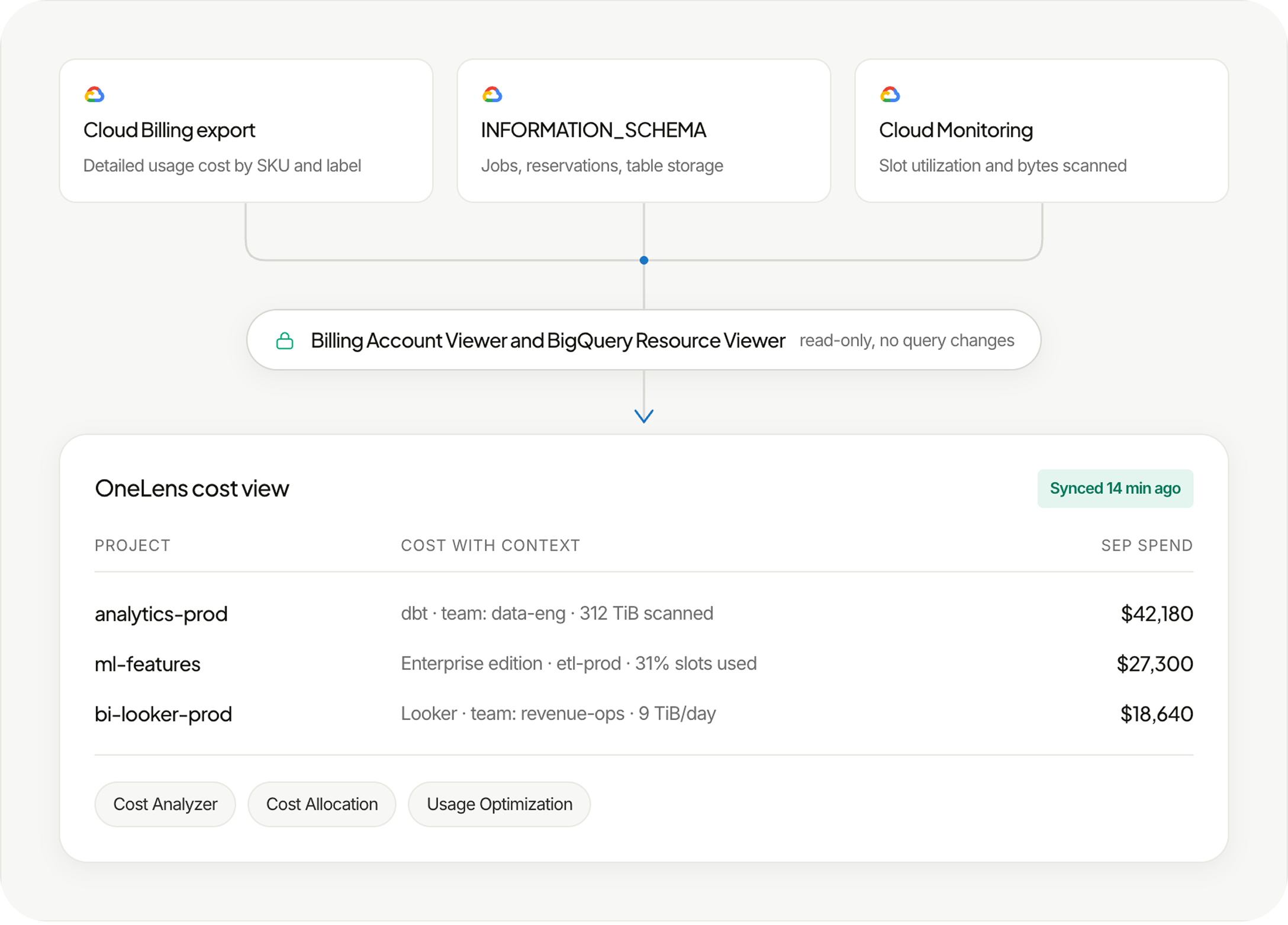
BigQuery connection flow showing billing export, INFORMATION_SCHEMA and Cloud Monitoring data reaching OneLens via read-only access.

Trace BigQuery cost to the query, table and slot behind it

Cost attribution

Tie every BigQuery query and job to the team, pipeline or dashboard behind it

Look past the project total to the service account, dbt model, Looker dashboard and user behind each job. Bring that spend together by team for showback and chargeback, so every owner sees their own share.

BigQuery cost attribution view showing project spend split by team, service account, dbt models and Looker dashboards, with owners.
Query optimization

Find the queries scanning terabytes and the fix for each one
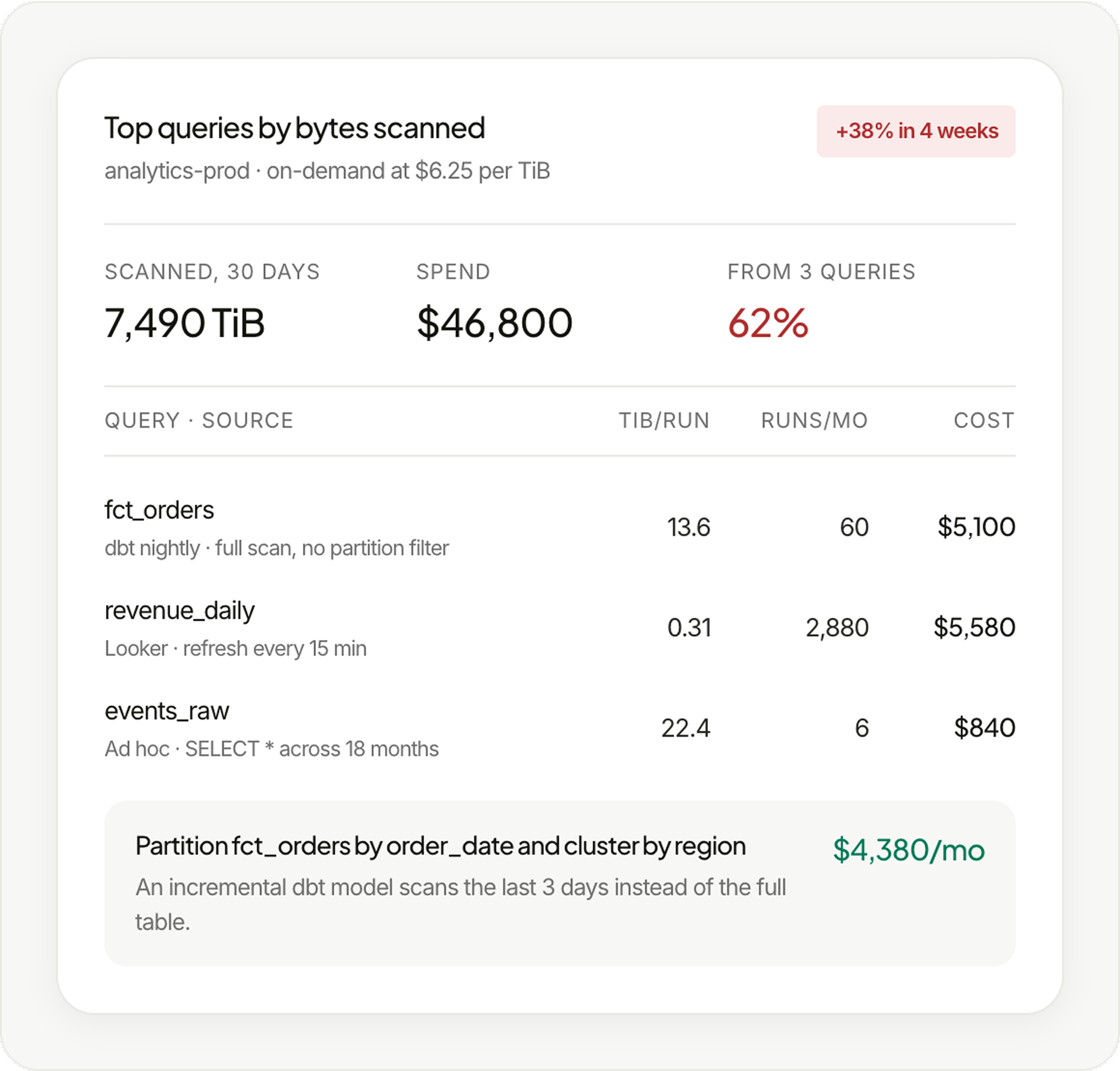
BigQuery query view ranking the costliest queries by bytes scanned, with cost per query and a partitioning fix priced per month.
Compute right-sizing

Match each workload to on-demand or Editions and size its slots

BigQuery slot reservation view comparing used slots against baseline, with right-sizing and on-demand options priced per month.
Storage billing

Move the right datasets to physical storage billing

BigQuery storage billing view comparing logical and physical cost per dataset and recommending physical billing for the right ones.
Unused tables

Find tables nobody has read in months, with owner and last use

BigQuery unused tables view listing tables with no recent reads, with owner, size, last-read date, monthly cost and an expiry fix.
Alerts and guardrails

Keep BigQuery savings in place with spend alerts and query byte limits

Catch spend anomalies by project, team or job and route them to Slack or email for the owner. Apply recommended byte limits and quotas so a single runaway query stays inside the budget.

BigQuery guardrails view showing spend limits, project quotas, refresh anomalies and byte limits, with alerts routed to Slack.

Connect BigQuery spend to the jobs, usage and teams that create it

Give every query an owner

Allocate BigQuery spend across projects, reservations, service accounts, labels and teams, including shared slot capacity that several teams draw from.

Decide based on warehouse usage

Combine cost with bytes scanned, slot utilization, query frequency and table access history to judge query fixes, reservation size and storage billing.

Know what each data product costs

Track cost per dashboard, pipeline, data product or customer, so data teams can see whether warehouse spend grows in line with the value it delivers.

Turn cost signals into work that gets done

OneLens ranks each fix by dollar impact, assigns an owner, routes the next step and tracks warehouse spend against plan.

BigQuery ticket showing a full table scan in a dbt model, routed to its owner with the recommended fix and potential savings.
Tickets

Create policy-driven tickets with the affected resource, recommended action and potential savings, so the owner has the context needed to act.
Slack, Jira and other workflow integrations for routing cloud cost actions and optimization events.
Workflows

Set budgets by team, project or reservation, compare actual and projected month-end spend, and alert owners as BigQuery spend approaches the limit.
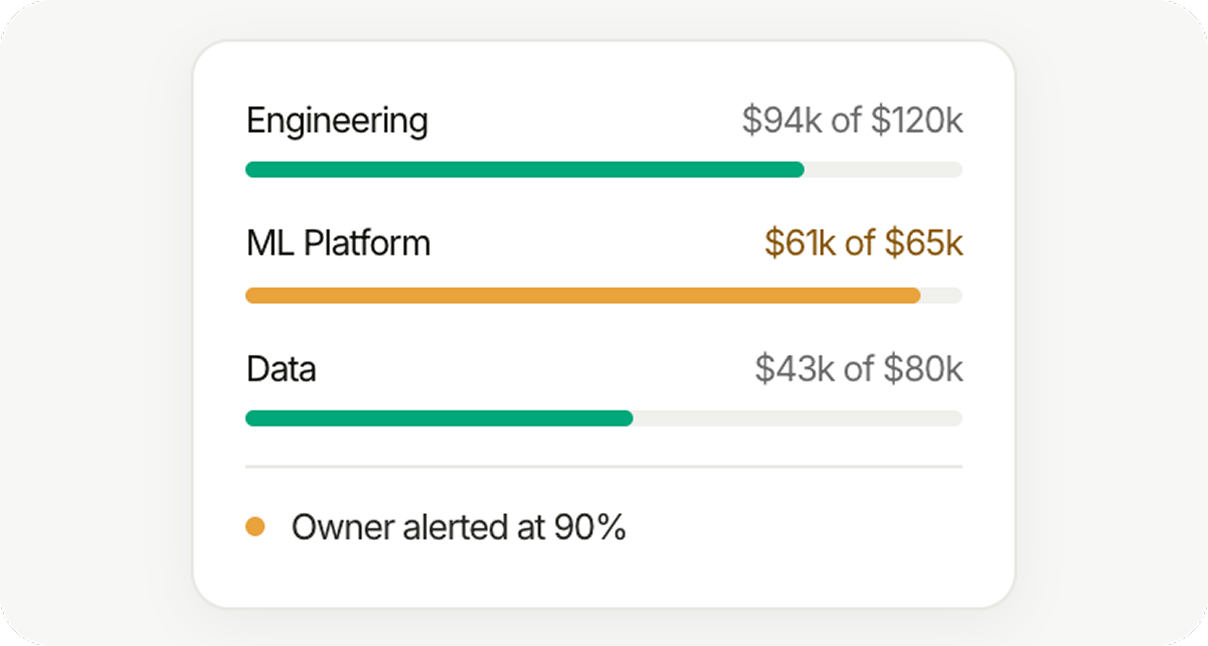
BigQuery budgets view showing team spend against budget thresholds, with the owner alerted as spend nears the limit.
Budgets

Track actual and projected spend against configured budget thresholds, and alert owners when spend is approaching or expected to exceed them.

Bring query-level control to your BigQuery spend

The platform suggested changes in our infrastructure setup that led to significant savings and better resource utilization.
Rohith P
Engineering @ Merittrac
The best thing about OneLens has to be their support team - they're super quick to help when you need them.
Ayush
Engineering Manager - SquadStack
Once we started using Astuto OneLens, the dashboard provided clear, actionable cost-saving insights, leading to significant savings in just two weeks!
Hari Pulijal
COO – BrightQuery
The platform suggested changes in our infrastructure setup that led to significant savings and better resource utilization.
Rohith P
Engineering @ Merittrac
The best thing about OneLens has to be their support team - they're super quick to help when you need them.
Ayush
Engineering Manager - SquadStack
Once we started using Astuto OneLens, the dashboard provided clear, actionable cost-saving insights, leading to significant savings in just two weeks!
Hari Pulijal
COO – BrightQuery
The platform suggested changes in our infrastructure setup that led to significant savings and better resource utilization.
Rohith P
Engineering @ Merittrac
The best thing about OneLens has to be their support team - they're super quick to help when you need them.
Ayush
Engineering Manager - SquadStack
Once we started using Astuto OneLens, the dashboard provided clear, actionable cost-saving insights, leading to significant savings in just two weeks!
Hari Pulijal
COO – BrightQuery
With real-time prioritization and ready-to-execute recommendations, we’ve fundamentally changed how we manage cloud efficiency at scale.
Mohammed Zeeshan Shaikh
DevOps Lead - airpay
OneLens helps solve the lack of visibility and control over cloud costs by providing real-time insights and anomaly detection.
Vinay
DevOps @ Fello
OneLens has greatly improved our visibility into Business to Service mapping, allowing us to track costs more accurately through dedicated cost centers.
Naveen Ale
DevOps Engineer, DTDC
With real-time prioritization and ready-to-execute recommendations, we’ve fundamentally changed how we manage cloud efficiency at scale.
Mohammed Zeeshan Shaikh
DevOps Lead - airpay
OneLens helps solve the lack of visibility and control over cloud costs by providing real-time insights and anomaly detection.
Vinay
DevOps @ Fello
OneLens has greatly improved our visibility into Business to Service mapping, allowing us to track costs more accurately through dedicated cost centers.
Naveen Ale
DevOps Engineer, DTDC
With real-time prioritization and ready-to-execute recommendations, we’ve fundamentally changed how we manage cloud efficiency at scale.
Mohammed Zeeshan Shaikh
DevOps Lead - airpay
OneLens helps solve the lack of visibility and control over cloud costs by providing real-time insights and anomaly detection.
Vinay
DevOps @ Fello
OneLens has greatly improved our visibility into Business to Service mapping, allowing us to track costs more accurately through dedicated cost centers.
Naveen Ale
DevOps Engineer, DTDC
Other integrations
Which BigQuery costs can OneLens analyze and optimize?

OneLens combines GCP billing data with BigQuery job, reservation and table metadata to cover on-demand analysis, Editions slot reservations and commitments, logical and physical storage, streaming inserts and scheduled queries. Teams can then act on query fixes, the right pricing model per workload, storage billing and unused tables rather than a single BigQuery line on the invoice.

2. How does OneLens help lower BigQuery compute costs?

OneLens prices every query from bytes billed or slot usage and flags full table scans, SELECT *, missing partition filters and repeated queries, with partitioning, clustering, materialized views or BI Engine as the fix. It also models on-demand against BigQuery Editions per project and workload, and finds idle or oversized slot reservations rather than applying one model everywhere.

3. Can OneLens tell us which datasets to move to physical storage billing?

Yes. OneLens compares logical and physical storage billing per dataset, including the time-travel and fail-safe bytes that physical billing charges for, so high-churn tables that would cost more stay where they are. It also shows whether a shorter time-travel window saves enough to be worth it, rather than recommending one switch for every dataset.

4. How does OneLens allocate BigQuery costs when labels are incomplete?

OneLens attributes each job through its project, service account, user, reservation and labels, then maps those to teams with business mappings and virtual tags. Shared slot reservations are split by each team's actual slot usage, so allocation does not depend on every query carrying a perfect label.

5. How is OneLens different from Cloud Billing reports for BigQuery?

Cloud Billing reports show BigQuery spend by project, SKU and label, which works well for reconciling the invoice. OneLens adds the query, table, reservation and owner behind each cost, ranks the fixes by dollar impact and alerts the owner when spend moves, rather than stopping at the monthly total.

6. How is OneLens different from other BigQuery cost optimization tools?

Many tools list expensive queries and leave the follow-up to your team. OneLens puts a dollar value on each fix across queries, slot reservations, storage billing and unused tables, then turns it into a ticket with an owner and the potential savings. The same cost model covers AWS, Azure, GCP and OCI, so BigQuery is never managed in isolation.

7. Can OneLens forecast BigQuery spend and flag budget overruns?

Yes. OneLens tracks BigQuery spend against budgets by team, project or reservation, projects month-end spend and alerts owners as it approaches the limit. The forecast shows which queries, pipelines or reservations are driving the overrun, rather than an unexplained projected number.

8. Which other clouds and platforms does OneLens cover?

OneLens covers AWS, Azure, GCP and OCI alongside Kubernetes, GPU infrastructure, LLM and AI spend, and observability costs. Data platforms such as BigQuery, Snowflake and Databricks sit in the same cost model, so data, cloud and AI spend can be compared and governed in one place.