AI • Multi-cloud • GPU cost intelligence

Every Token, Every Model, Every Dollar. Finally in One View

Track AI costs and usage across providers, models, teams and products. See the tokens, requests and inferences behind your spend, and connect AI costs with the rest of your cloud infrastructure.
Read-only access · No prompts leave your environment

Trusted by Engineering & FinOps teams from leading businesses

Your AI stack in one place

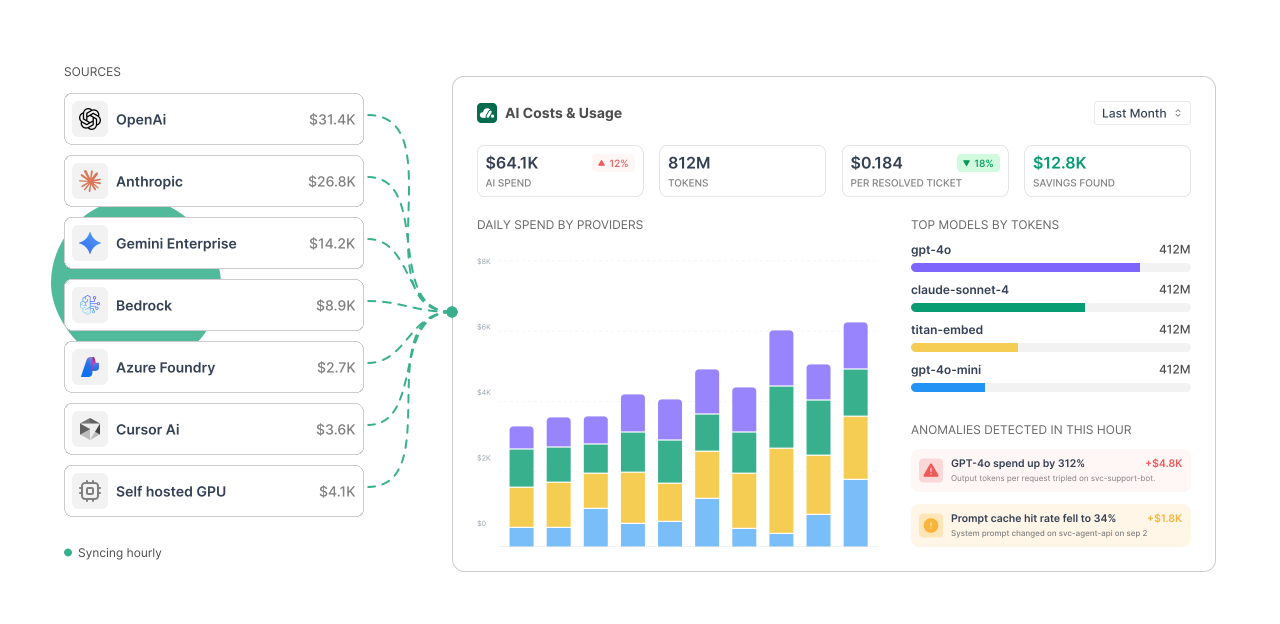
AI spend is spread across different providers, models and accounts. OneLens brings that data together and gives you a consistent view of cost and usage.
Anthropic
Azure AI Foundry
Bedrock
Cursor Ai
OpenAI
Gemini Enterprise
LiteLLM
Claude
Track spend, tokens, requests, model usage and more without switching between provider dashboards.
BUDGETS & ALLOCATION

One view across your AI stack

AI spend is spread across different providers, models and accounts. OneLens brings that data together and gives you a consistent view of cost and usage.
01
OBSERVABILITY

All your AI usage. One view.

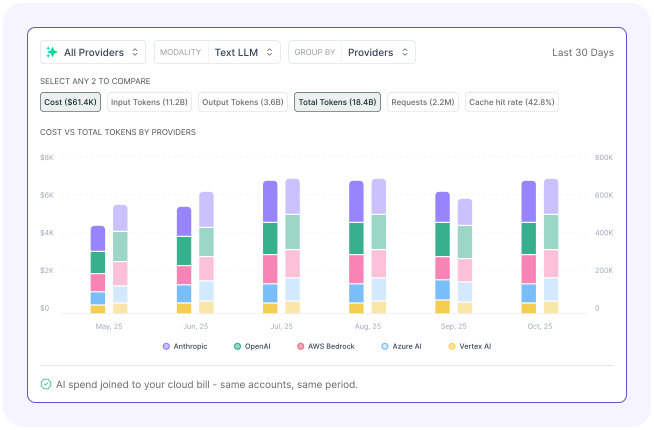
See spend, tokens, requests and inferences across your AI providers. Compare models, drill into usage and connect AI spend with your cloud costs.
Track
Tokens
Requests
Inferences
Cache
Cost
Compare
Providers
Models
Teams
Callers
02
UNIT ECONOMICS

Know what each AI outcome costs.

A model's price doesn't tell you what an AI feature or product actually costs. With OneLens, you can calculate the cost of an inference, an agent run, a customer, a feature or a specific use case.
Cost per
Inference
Agent run
Customer
Feature
Use case
03
ANOMALIES

Catch unusual spend as it happens.

AI usage can change quickly. OneLens detects unusual cost and usage patterns in real time and helps you find what caused them.
Detect
Investigate
Resolve
Drill Down By
Account
Model
Caller
Token Type
04
BUDGETS & ALLOCATION

Give every AI dollar an owner.

Give every dollar an owner. Allocate AI spend across your business hierarchy and set budgets around the dimensions that matter to you.
Allocate
Team
Product
Project
Customer
Budget
Provider
Model
Caller
API Key
05
INSIGHTS

Turn AI usage into useful answers.

OneLens helps you understand what's changing in your AI usage and spend, and where to look next.
AI COSTS, UNDER CONTROL

From usage data to business decisions.

1

See

Every provider, model and usage metric.
2

Understand

What's driving your
AI costs.
3

Control

Budgets, anomalies and ownership.
4

Measure

The cost of your AI products and outcomes.
SEE YOUR AI SPEND CLEARLY

Get a clearer picture of what your AI costs.

AI cost goes beyond the model. Your AI product also uses databases, compute, storage, networking and other infrastructure. OneLens brings your LLM spend and cloud infrastructure together, so you can see the full cost of running an AI product.
LLM
Tokens · Requests · PTU · PayG
Infrastructure
Compute · Databases · Storage · Network
Datacentre
On-prem · Custom sources
Bring it all together in one view for allocation, budgets and chargeback, All Mapped to FOCUS
Read-only access · Minimal setup · See value quickly
How can I track multiple AI providers?

Connect your AI providers to OneLens and bring their billing and usage data into one view. Compare spend, tokens, requests and model usage across providers without switching between dashboards.

How can I track AI usage metrics?

Use OneLens to break AI spend down into the usage behind it. Track tokens, requests, inferences, cache usage and cost per request, then drill down by provider, model, key, caller or user.

How do I compare different AI models?

Compare models using both cost and usage data in the same view. See which models are costing more, how their usage differs, and where you may be able to make better model choices. The deck also supports cross-provider price comparison.

How do I calculate cost per inference or agent?

Define the business metric you care about and connect it to your AI usage. Measure cost per inference, agent run, customer, feature, session or use case instead of looking only at model-level spend.

How can I set budgets for specific models or teams?

Allocate AI spend to the right teams, products or projects, then set budgets around them. You can also create budgets by provider, model, caller, API key and other dimensions, with forecast and breach alerts to flag problems early.

Does OneLens see our prompts?

No. OneLens uses billing and usage APIs. Your prompts, model responses and inference logs stay within your environment.

Have questions not answered?
Talk to us