AI Cost Governance

Govern AI spend without slowing down the teams building with it
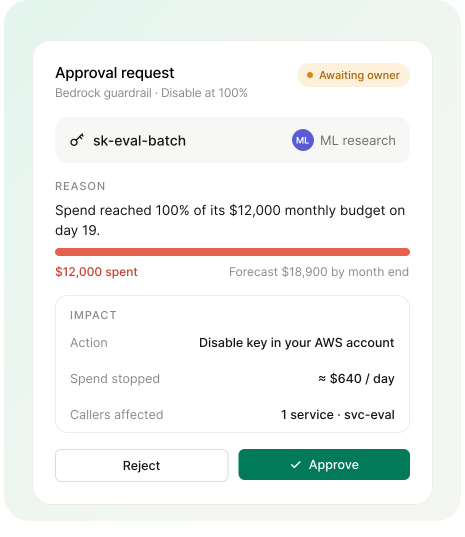
Give every AI key an owner and a budget based on its own history, apply one guardrail policy across a whole provider, and act only after the owner approves. Teams keep shipping while spend stays inside the plan.
Schedule a demo
OneLens AI cost governance approval request: a Bedrock key hit 100% of its $12,000 budget and waits for the owner to approve a disable

Stop runaway AI spend before it reaches the month-end bill
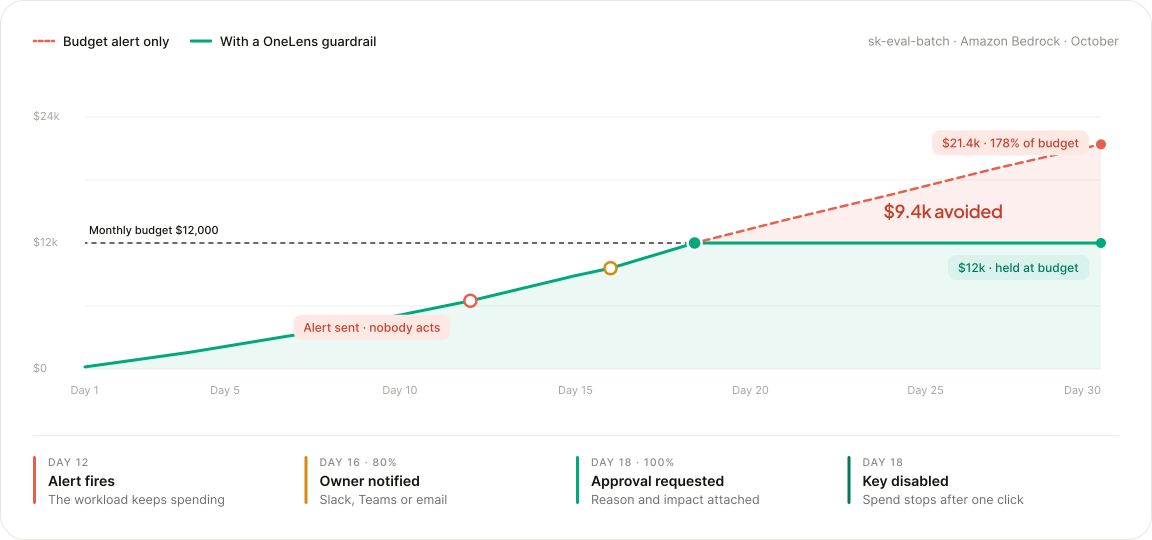
A budget alert only reports the overrun. With OneLens AI spend control, the owner approves what happens at the limit.
AI spend control chart: a budget alert alone lets spend reach $21.4k, while a OneLens guardrail holds it at the $12k budget

Govern AI spend across hundreds of callers without key-by-key setup
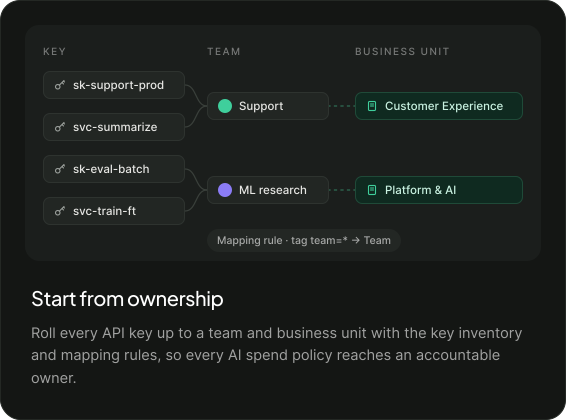
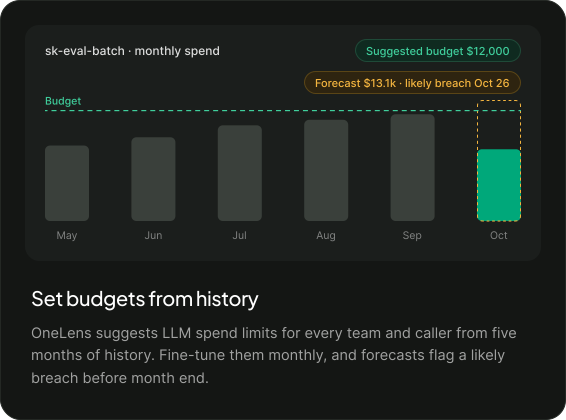
API keys mapped to Support and ML research teams and their business units, so every AI spend policy has an accountable owner Monthly LLM spend from May to October with a suggested $12,000 budget and a forecast flagging a likely breach on Oct 26
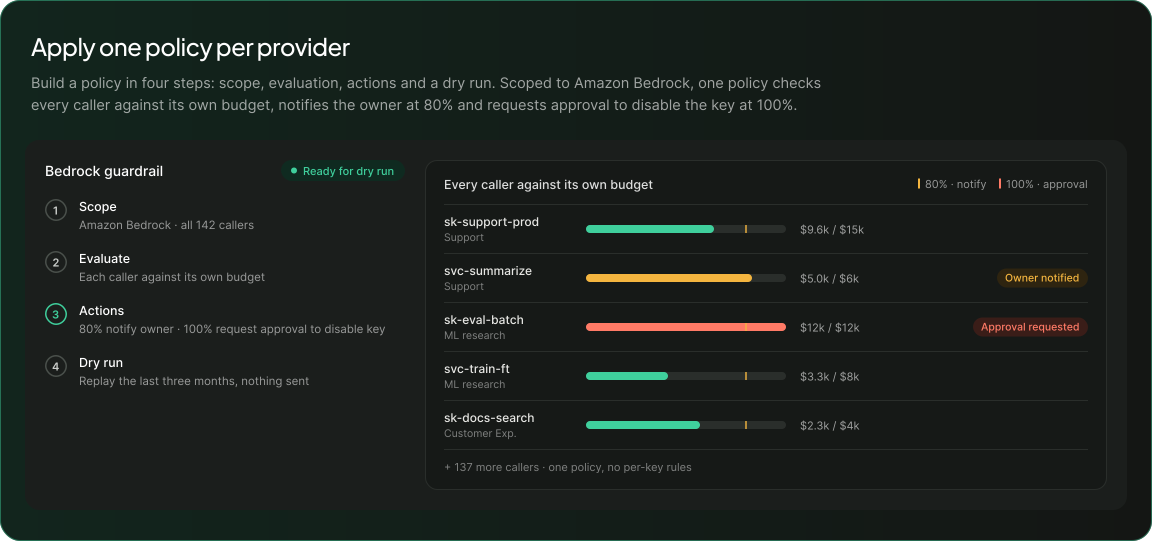
Bedrock guardrail checking 142 callers against their own budgets, notifying owners at 80% and requesting approval at 100%
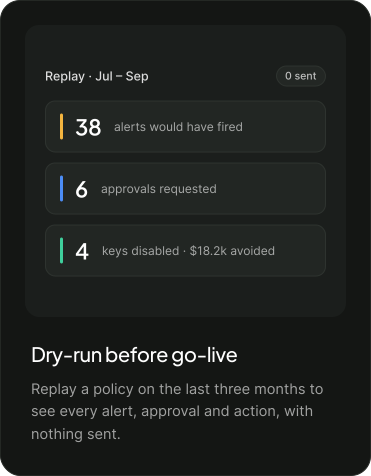
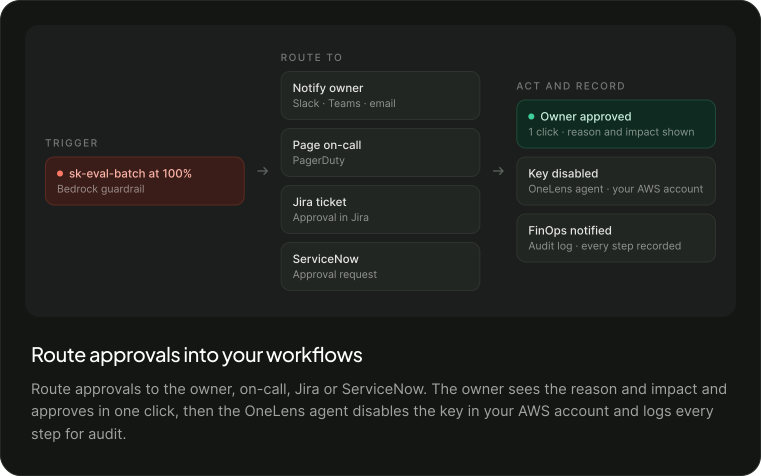
Dry-run replay of July to September: 38 alerts, 6 approvals and 4 keys disabled, with $18.2k avoided and nothing sent AI spend approval routed to the owner, on-call, Jira or ServiceNow, then OneLens disables the key and logs each step

Use guardrails to let AI teams move faster

Launch a new AI experiment
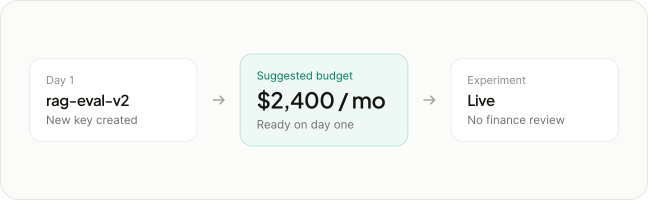
Platform gives the team a suggested budget on day one, so the AI experiment starts without a finance review.
New AI experiment key rag-eval-v2 gets a suggested $2,400 monthly budget on day one and goes live without finance review
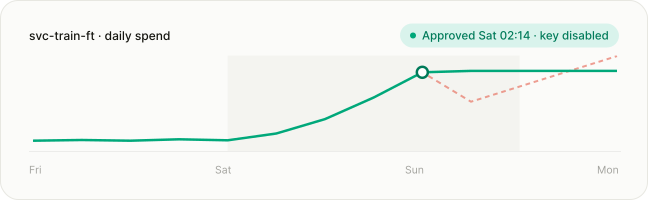
Weekend daily spend for svc-train-ft flattens after the owner approves a key disable on Saturday at 02:14

Stop a weekend runaway

The owner approves the key disable in one click, and AI spend stops before Monday.

Extend control to the next provider

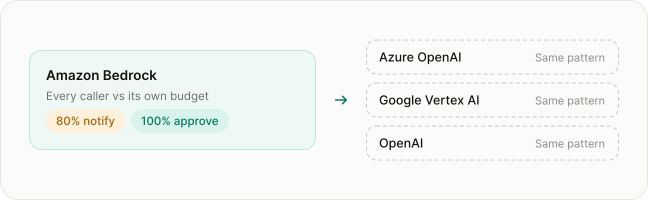
FinOps copies the Bedrock policy to the next provider instead of writing rules per key.
Amazon Bedrock guardrail copied to Azure OpenAI, Google Vertex AI and OpenAI, giving one AI spend policy per provider
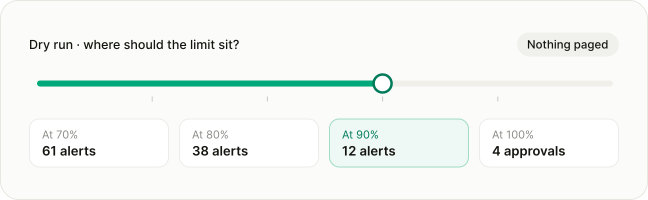
Dry-run budget limit slider: 61 alerts at 70%, 38 at 80%, 12 at 90% and 4 approval requests at 100%

Agree on the threshold

The dry run settles where the budget limit should sit before anyone is paged.

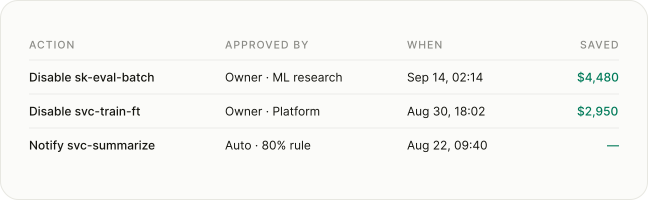
Answer the audit

Finance shows who approved each action, when it happened and what it saved, ready for showback and chargeback.
AI cost governance audit log showing each key disable or alert, who approved it, when, and how much it saved

See what a guardrail would have done to your last three months

Run a dry run on your own usage. OneLens sends nothing and changes nothing until you decide.
What is AI cost governance?

AI cost governance is the set of budgets, policies and approvals that keeps AI spend inside the plan. OneLens gives every AI key an owner and a budget, then applies one guardrail policy per provider.

What is the difference between budget alerts and hard spend limits for AI?

A budget alert reports that a limit was crossed while the workload keeps spending. A hard limit stops spend at the threshold. OneLens adds the owner: notify at 80%, approve a key disable at 100%.

How do I set LLM spend limits per team?

Map every API key to a team and business unit, then set a budget for each caller from its last five months of spend. One policy per provider checks every caller against its own budget.

How do we stop AI agents and runaway keys from running up token bills?

Set a guardrail that requests approval to disable the key at 100% of budget. The owner approves in one click, the OneLens agent disables the key in your AWS account, and spend stops.

How do we govern AI spend without slowing developers down?

Give teams a suggested budget on day one, dry-run every policy on the last three months before go-live, and act only after the owner approves, so experiments start without a finance review.