

Cut Snowflake spend by 30% on avg. across warehouses, queries and storage
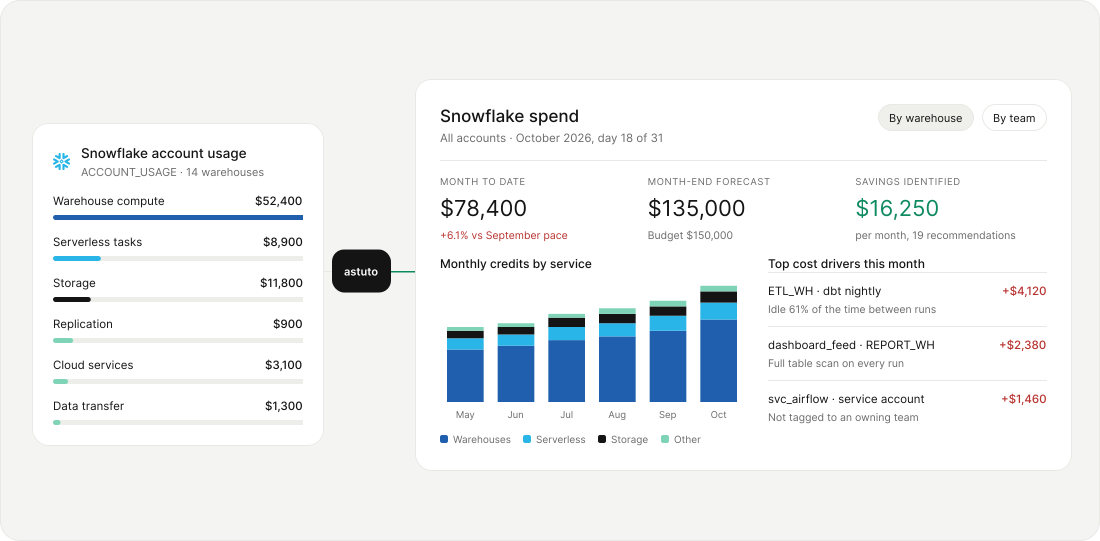
30%
36 hrs
$2M+
12+
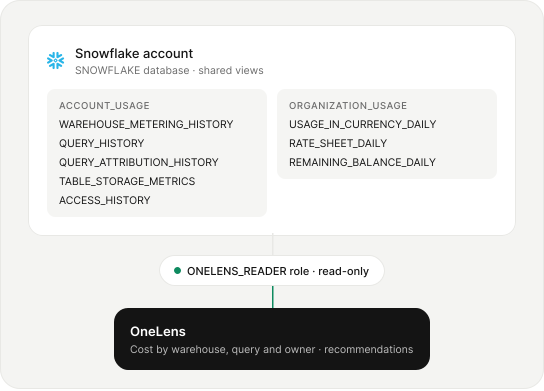
Connect Snowflake with a read-only role and nothing to install
OneLens reads the ACCOUNT_USAGE and ORGANIZATION_USAGE views in your SNOWFLAKE database through a dedicated read-only role: metering, query, storage and access history.
Spot where Snowflake credits go to waste before the invoice arrives
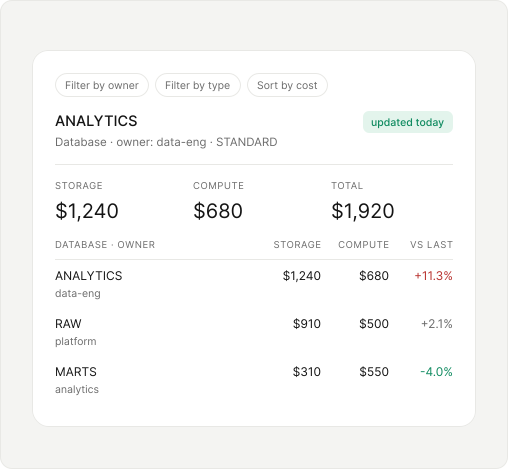
Know what each Snowflake database costs to store and to query
Put storage and compute cost side by side for every database, filter by owner and type, and compare each one with the previous period so a rise shows up on the day it starts.
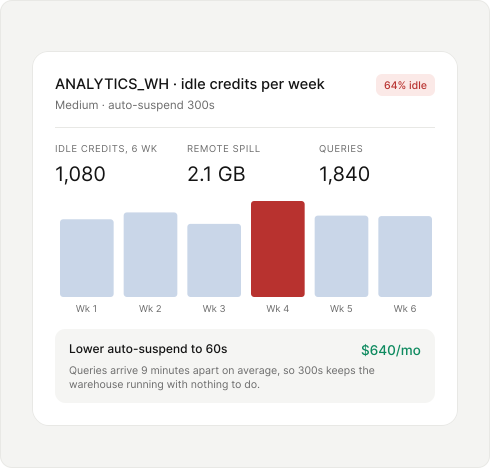
Find warehouses spending credits while no queries are running
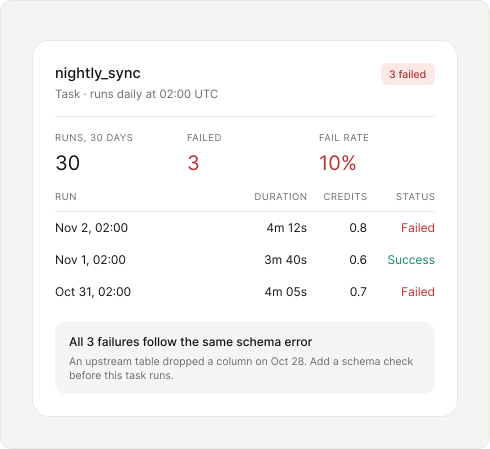
Catch failing scheduled tasks and the credits each failed run wastes
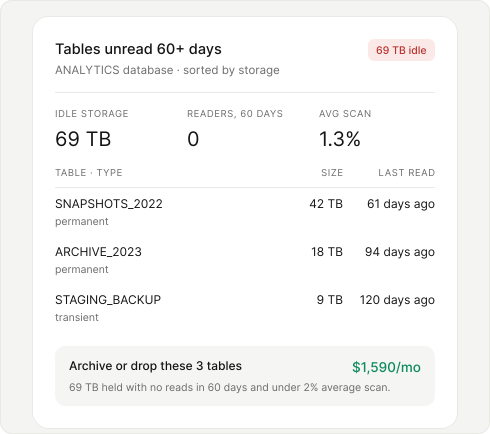
Archive or drop tables that hold storage without any recent readers
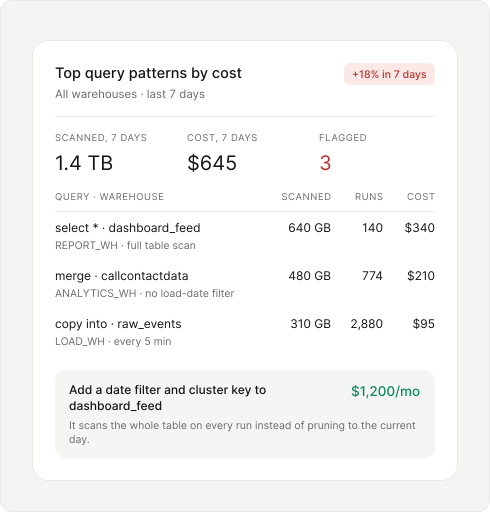
Flag the query patterns that scan the most data and cost the most
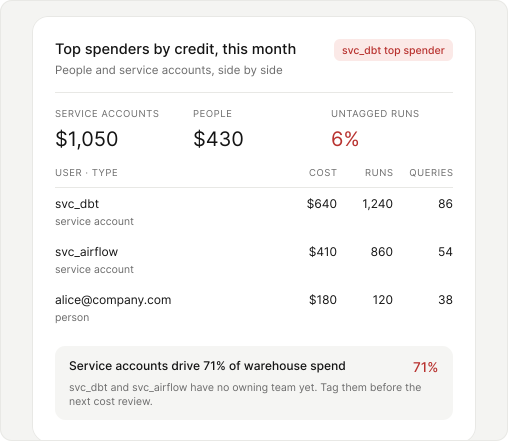
Attribute every credit to the person or service account that ran it
Split warehouse spend between people and service accounts such as dbt and Airflow showing runs and queries per user, and flag service accounts that are not yet tagged to an owning team.
Connect Snowflake spend to the warehouses, usage and owners behind it

Give every Snowflake warehouse an owner
Allocate credits by database, warehouse, owner, user and service account, and flag untagged runs that no team has claimed yet.

Choose fixes from how warehouses really run
Combine credits with idle time, remote spill, query volume, data scanned and last-read dates before you change a warehouse or drop a table.

Turn Snowflake credits into cost per data product
Report Snowflake cost per database, team or pipeline, and compare it with query volume to see whether each dollar does more work over time.
Turn Snowflake cost signals into work that gets done
Move from identifying a cost issue to assigning ownership, routing the right action, and keeping spend against plan.
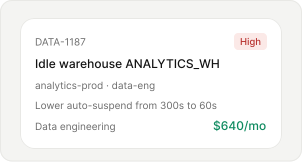
Tickets
Create policy-driven tickets with the affected resource, recommended action and potential savings, so the owner has the context needed to act.
Workflows
Route cost anomalies, policy violations and ticket events into Slack, Jira, ServiceNow and the workflows your teams already use.
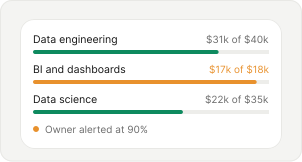
Budgets
Track actual and projected spend against configured budget thresholds, and alert owners when spend is approaching or expected to exceed them.
Manage Snowflake spend at the warehouse and query level




Snowflake cost optimization with OneLens covers six areas: database cost, idle warehouses, scheduled tasks, unused tables, costly query patterns and spend by user. Each flagged item comes with the fix, its owner and the monthly dollar amount it would save.
You can reduce Snowflake costs with OneLens by shortening auto-suspend on idle warehouses, fixing queries that scan full tables and archiving tables nobody reads. OneLens finds each one in your existing usage data and puts a dollar value on the fix.
OneLens differs from other Snowflake cost optimization tools by placing Snowflake next to your AWS, Azure, GCP, Kubernetes and AI spend in one platform. Each Snowflake finding becomes a ticket with an owner, a recommended action and potential savings, routed to Slack, Jira or ServiceNow.
OneLens lowers Snowflake warehouse cost by finding the credits a warehouse spends while it waits for the next query. It compares idle credits, query volume, remote spill and auto-suspend settings for each warehouse, then recommends a shorter auto-suspend with its monthly savings.
Yes, OneLens supports Snowflake query cost attribution by ranking query patterns by cost, data scanned and run count on each warehouse. It also ties spend to the user or service account that ran each query, so every costly pattern has an owner.
OneLens handles Snowflake cost monitoring by trending daily spend for every database and warehouse against the previous period and against budget. Owners are alerted at the threshold you set, such as 90%, and alerts can go to Slack, Jira or ServiceNow.
OneLens handles Snowflake cost allocation by assigning credits to databases, warehouses, users and service accounts, then to the teams that own them. Untagged service accounts are flagged so they can be attributed to a team before the next cost review.
Yes, OneLens lowers Snowflake storage cost by finding tables nobody has read in 60 days or more, sorted by size. It shows each table's type, last-read date and average scan percentage, and puts a monthly saving on archiving or dropping them.


