Know what every repo and workflow costs on GitHub
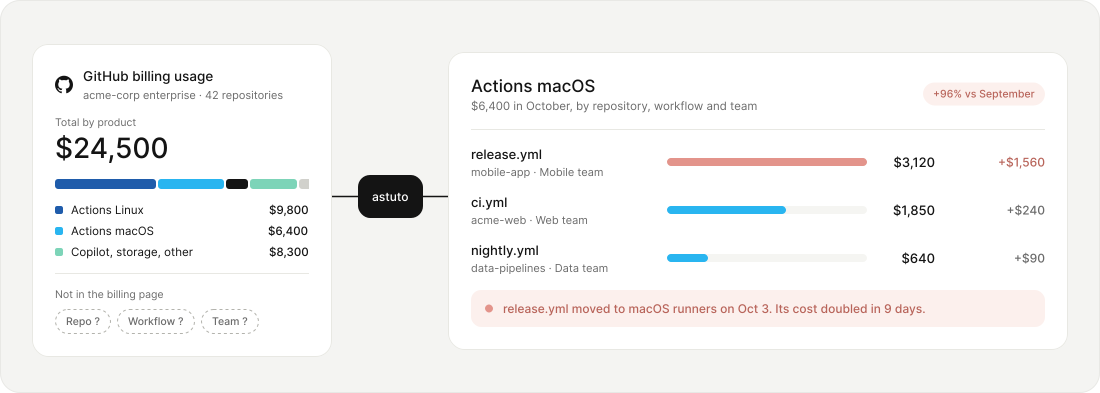
30%
36 hrs
$2M+
12+
Connect GitHub without touching a single workflow
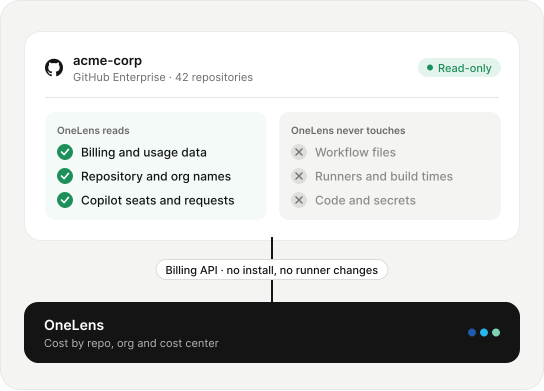
OneLens reads GitHub billing and usage data through read-only access at the enterprise or organization level. There's nothing to install in your repos, no runner changes and no effect on build times.
Trace GitHub cost to the repo, org and cost center behind it
The GitHub bill tells you what you spent. OneLens tells you where it went, who spent it and what changed.
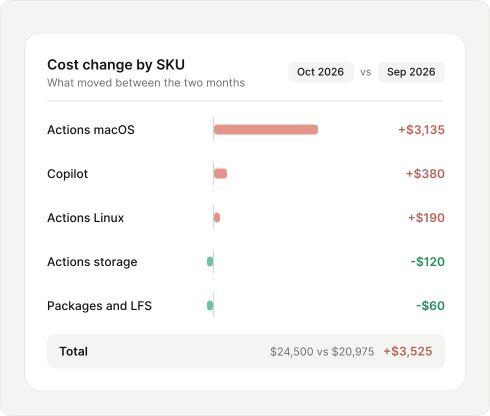
See exactly which GitHub products you pay for, month by month
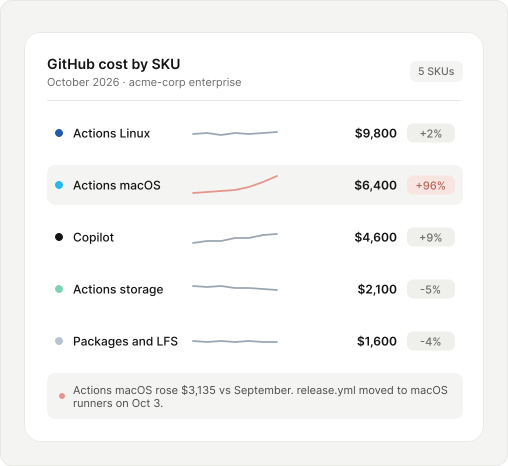
Break the bill into Actions Linux, Actions macOS, Actions storage, Packages storage and data transfer, Git LFS and Copilot. Spot the SKU that moved, not just the total.
Tie GitHub spend to the repository, organization and product that used it
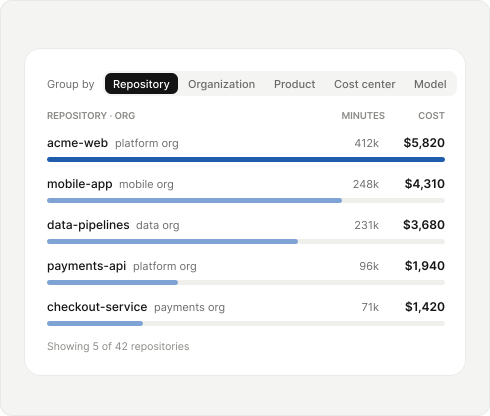
Group by repository, organization, product, cost center or model to see who drove each dollar. Find the repos whose workflows burn the most minutes.
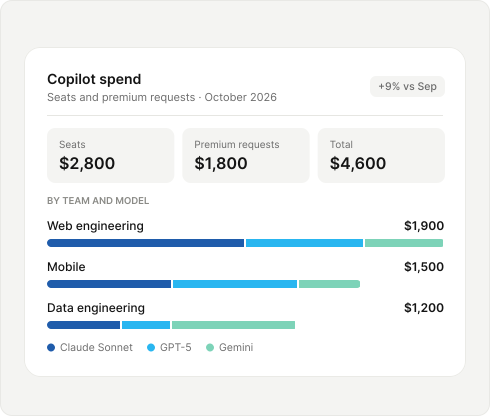
Track Copilot cost by model and team
See Copilot spend by model and by team, so AI coding costs sit next to the rest of your AI spend in OneLens.
Know what changed and by how much
Compare any period with the one before it, with dollar and percent deltas per SKU and month-to-date tracking. Export the view in one click for your monthly review.
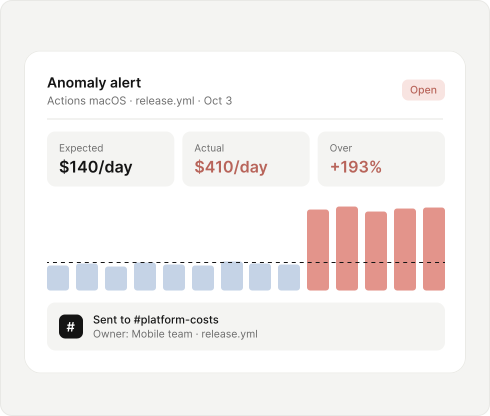
Catch a runaway workflow before the invoice does
OneLens flags spikes in minutes, storage or Copilot usage by repo, org or SKU, and routes the alert to the owner in Slack or email.
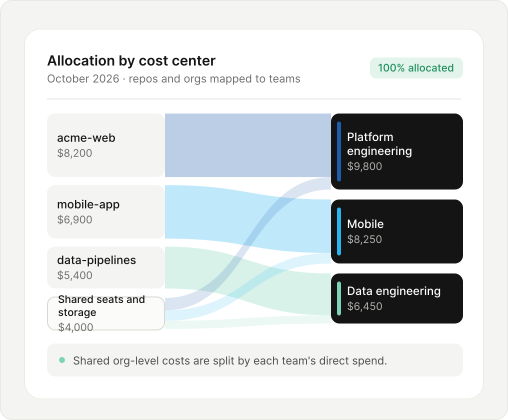
Allocate every GitHub dollar to a cost center
Map repos and orgs to teams with cost centers and virtual tags for showback and chargeback, including shared org-level costs like seats and storage.
Connect GitHub spend to the repos, usage and teams that create it

Give every repo an owner
Allocate GitHub spend across orgs, repos, products and cost centers, including shared org-level charges, so no line on the bill goes unclaimed.

Decide based on usage
Put cost next to runner minutes, storage and Copilot usage to choose the right runners, set retention and right-size seats.

Govern dev tooling with cloud spend
GitHub sits in the same cost model as AWS, Azure, GCP, OCI and your AI providers, so engineering cost is managed in one place.
Turn GitHub cost signals into work
Move from identifying a cost issue to assigning ownership, routing the right action, and keeping spend against plan.
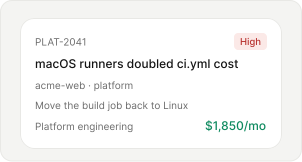
Tickets
A workflow moved to macOS runners and doubled its cost? Open a Jira ticket for the repo owner with the cost change attached.
Workflows
Send a Slack alert to the platform channel when Actions minutes for an org jump past their normal range.
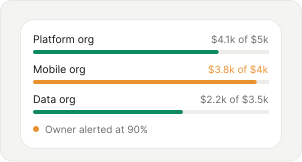
Budgets
Set a monthly GitHub budget per org or cost center and get notified before it's spent, not after.
Bring repo-level control to your GitHub spend



OneLens tracks the GitHub costs that appear on your bill: Actions minutes by runner type (Linux, macOS and others), Actions storage, Packages storage and data transfer, Git LFS, and Copilot seats and usage. Each shows up as its own SKU, month by month.
You can group GitHub spend by repository, organization, product, cost center or model. Cost centers and virtual tags then map repos and orgs to the teams that own them, so each team sees its share for showback or chargeback.
OneLens watches each SKU, repo and org for spend that breaks from its normal pattern, such as a workflow stuck in a loop or a jump in macOS minutes. When it finds one, it alerts the owner in Slack or email so they can act before the month closes.
OneLens needs read-only access to GitHub billing and usage data at the enterprise or organization level. It doesn't read your code, change workflows or touch runners, and it has no effect on build times.
GitHub's billing page shows what you owe by product. OneLens adds who owns each dollar, allocation to cost centers, period-over-period deltas, anomaly alerts and budgets, all in one view with your cloud and AI spend.
OneLens brings together spend from AWS, Azure, Google Cloud, OCI, data platforms like BigQuery, and AI providers, alongside GitHub.