OpenAI
Integration

Track OpenAI API costs by user and model
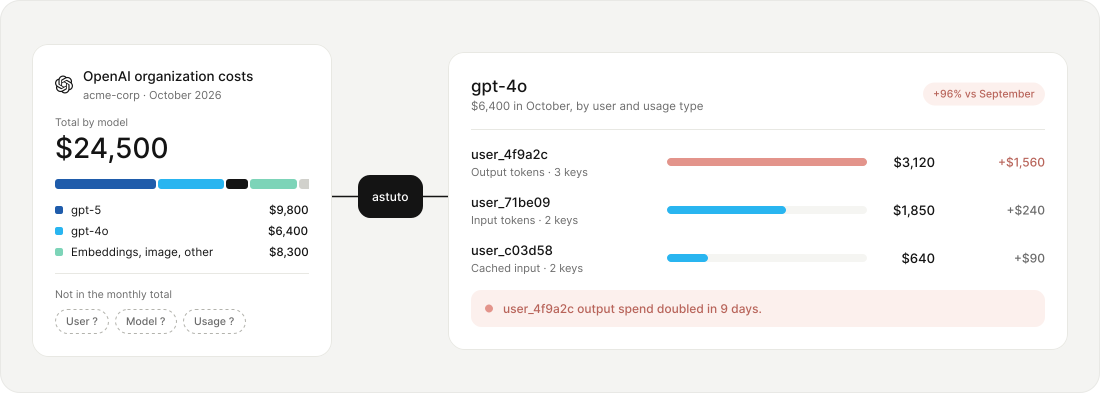
Connect your direct OpenAI API organization to OneLens with a read-only key and see what each user spends on each model and usage type, while OneLens never accesses your prompts or completions.
OpenAI API cost tracking in OneLens: monthly spend by model, then gpt-4o cost per user and usage type with a spike flagged
Usage-based spend grows with every user, request and model in the organization, so a monthly total does not say who or what drove it.

Connect OpenAI with a read-only key and nothing to install

OneLens connects with an OpenAI Admin API key set to read only and needs only three fields: an Integration Name, your Organization ID and the key. It reads cost metadata only, never your prompts or completions.
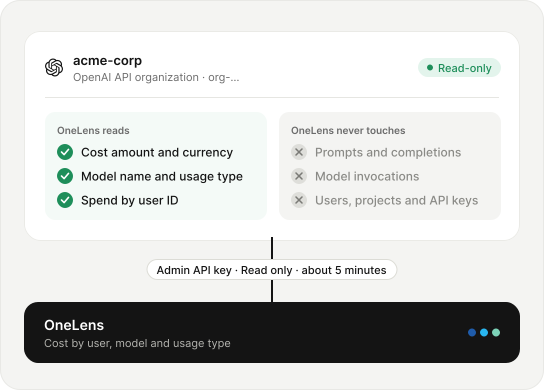
OneLens connecting to an OpenAI organization with a read-only Admin API key, reading cost data but never prompts or completions

Trace OpenAI cost to the user, model and usage type behind it

See who owns each dollar of spend
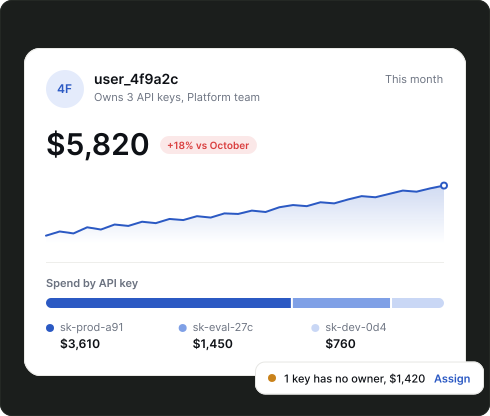
Spend is totaled by the user who owns the API key, so every dollar has a person to talk to. Spend with no owner is counted too.
OneLens view of OpenAI cost per user: one user owns three API keys, spend by key, and one unowned key flagged for assignment

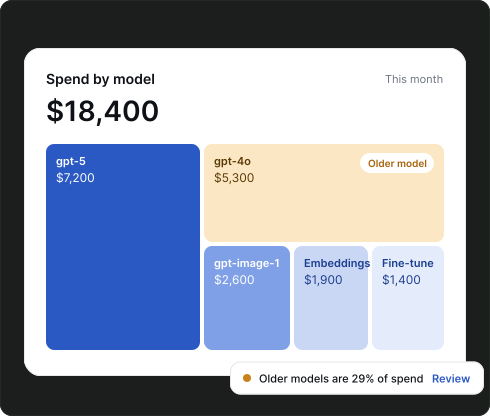
See which models take the budget

Spend by model shows how much still runs on older models, how much goes to image and embedding models and what fine-tuning runs cost, so the workloads to move first are clear.
OneLens treemap of OpenAI API cost by model, with gpt-5 largest and older models flagged at 29 percent of spend

See whether input, output or cache drives the bill
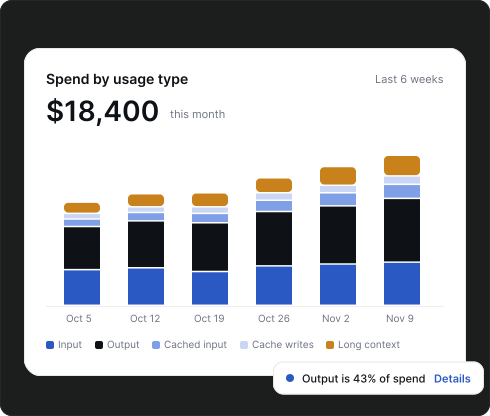
Input, output, cached input, cache writes and long-context spend are priced apart, so trimming prompts, shortening answers and adding caching can each be weighed against the others.
OneLens chart of OpenAI API spend by usage type over six weeks: input, output, cached input, cache writes and long context

Trace a jump in spend to the key behind it
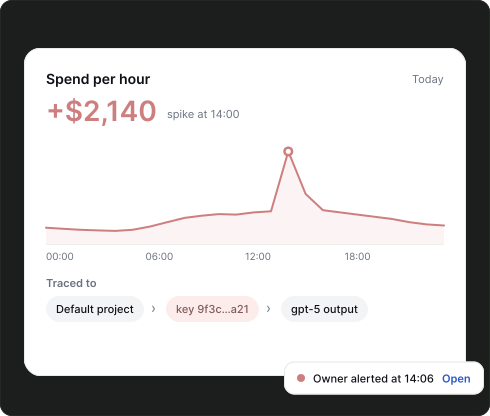
A spike narrows down to the single key or line item behind it. Resource IDs are hashed, so your team matches them to resources on its own side.
OneLens spend-per-hour chart with a spike traced from the default project to one API key and gpt-5 output, owner alerted

See what each OpenAI product costs, across ChatGPT, Codex and the API
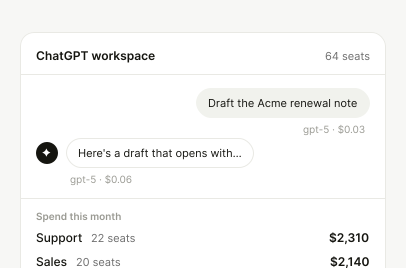
OneLens view of ChatGPT workspace spend: chat messages priced by model, with monthly spend per team across 64 seats

See everyday ChatGPT use costs

Chat spend is split by user and model across the workspace, so it is clear which teams rely on ChatGPT most and where seats and credits go.
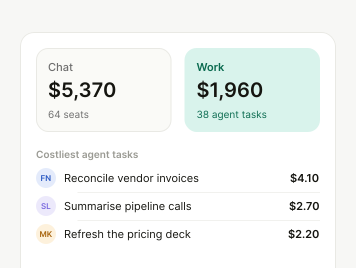
OneLens split of ChatGPT chat spend and Work agent spend, with the costliest agent tasks listed by cost

Give agent work its own line

Work, the agent that acts across apps and files, gets a cost line apart from chat, so spend from longer agent tasks has an owner as it grows.
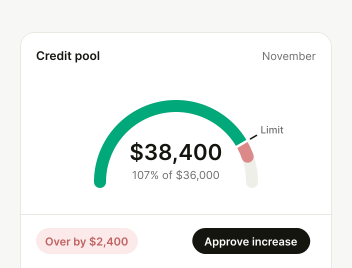
OneLens credit pool gauge showing OpenAI spend at 107 percent of the monthly limit, with an Approve increase button

Stay inside the credit pool

Credit-pool use is broken out by team along with whatever is running into overage, so limits are raised on purpose and not by surprise.
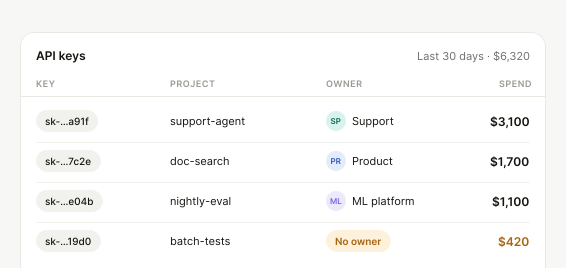
OneLens table of OpenAI API keys by project and owner, showing $6,320 spend in 30 days and one key with no owner

Know what your production workloads cost
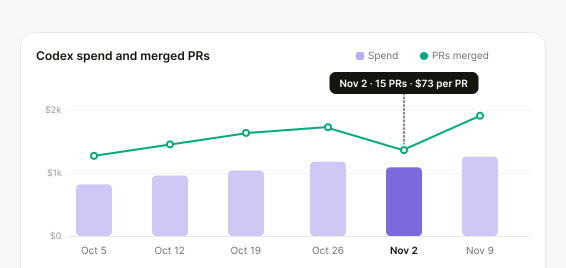
API spend is split by project, model and key owner, so each product team knows what its own workloads cost.
OneLens chart of weekly Codex spend against merged PRs, with a tooltip showing $73 per PR on Nov 2

Weigh coding agents against the value they return

Codex spend by developer and model sits next to the rest of the OpenAI bill, so engineering leads can judge what coding agents cost.
OneLens view of ChatGPT workspace spend: chat messages priced by model, with monthly spend per team across 64 seats

See everyday ChatGPT use costs

Chat spend is split by user and model across the workspace, so it is clear which teams rely on ChatGPT most and where seats and credits go.
OneLens split of ChatGPT chat spend and Work agent spend, with the costliest agent tasks listed by cost

Give agent work its own line

Work, the agent that acts across apps and files, gets a cost line apart from chat, so spend from longer agent tasks has an owner as it grows.
OneLens credit pool gauge showing OpenAI spend at 107 percent of the monthly limit, with an Approve increase button

Stay inside the credit pool

Credit-pool use is broken out by team along with whatever is running into overage, so limits are raised on purpose and not by surprise.
OneLens table of OpenAI API keys by project and owner, showing $6,320 spend in 30 days and one key with no owner

Know what your production workloads cost

API spend is split by project, model and key owner, so each product team knows what its own workloads cost.
OneLens chart of weekly Codex spend against merged PRs, with a tooltip showing $73 per PR on Nov 2

Weigh coding agents against the value they return

Codex spend by developer and model sits next to the rest of the OpenAI bill, so engineering leads can judge what coding agents cost.

Connect OpenAI spend to the owners, limits and value behind it

Visibility

Follow cost, tokens and invocations across the AI providers you connect read-only, down to the models, callers and teams behind them.

Governance

Set budgets and notify owners as spend approaches them, so teams keep building while owners stay informed.

ROI

Connect AI spend to value with cost per inference, per thousand tokens and per customer for each AI feature.

Turn OpenAI cost signals into tickets

Move from spotting an OpenAI cost change to assigning ownership, routing the next step and keeping spend against plan.
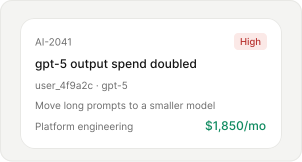
OneLens ticket for a gpt-5 output spend jump by user, with a High tag, a smaller-model fix and $1,850 a month savings
Tickets

Create policy-driven tickets with the affected user or model, the recommended action and the potential savings, so the owner has the context needed to act.
Slack, Jira and ServiceNow logos for routing OpenAI cost alerts into existing workflows
Workflows

Route OpenAI cost anomalies and ticket events into Slack, Jira, ServiceNow and the workflows your teams already use.
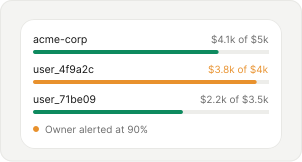
OneLens OpenAI budget alerts showing spend against limits per user and organization, with owner alerted at 90%
Budgets

Track actual and projected OpenAI spend against budgets set at the organization or user level, and alert owners when spend is approaching or expected to exceed them.


OpenAI logo tile for the OneLens OpenAI integration

See your OpenAI spend by user and model

Watch demo
How do I track OpenAI API costs by user?

Connect your OpenAI organization to OneLens with a read-only Admin API key. OneLens reads cost data from the Organization Costs API and shows what each user spends, broken down by model and usage type. Users appear as internal user_id values, not emails.

How do I connect OpenAI to OneLens?

An organization Owner creates an Admin API key named "OneLens Integration" at platform.openai.com with the permission set to Read only. Find your Organization ID under Settings, Organization, General, where it starts with org-, then enter the Integration Name, Organization ID and Admin API key in OneLens. Setup takes about 5 minutes.

What key does OneLens need for OpenAI?

OneLens needs an OpenAI Admin API key with the permission set to Read only, created by an organization Owner at platform.openai.com and named "OneLens Integration". OneLens uses it only to call GET /v1/organization/costs and does not invoke models or touch users, projects, API keys or audit logs.

Does OneLens read my prompts?

No. OneLens reads cost metadata only: the model name, usage type, cost amount and currency for each record. Prompts and completions are not accessed, and the integration does not invoke models. The connection is read-only.

How often does OpenAI data refresh?

OneLens polls OpenAI once daily. The first time you connect, it backfills your cost history automatically. Current-day figures may change as requests complete, so a day's total can differ from what you saw earlier in the day.

Does this cover Azure OpenAI?

No. This integration covers the direct OpenAI API only. Azure OpenAI is billed by Microsoft, so its costs are tracked through the Azure Cost Management integration, and you should connect that one if your models run on Azure.

Can I see OpenAI next to Anthropic and Bedrock?

Yes. OneLens shows OpenAI costs alongside Anthropic, AWS Bedrock, LiteLLM and other providers in a single dashboard, so your team can compare spend across providers in one view instead of reading each provider's bill separately.

How do I get alerted when OpenAI spend spikes?

OneLens alerts you when OpenAI spend deviates from its historical pattern, and you can also set budgets at the organization or user level with OneLens alerts. The integration documents alerts, not limits on API usage, so an alert tells you about a spike and leaves the decision to your team.