Cloud budgets that keep pace with your spend
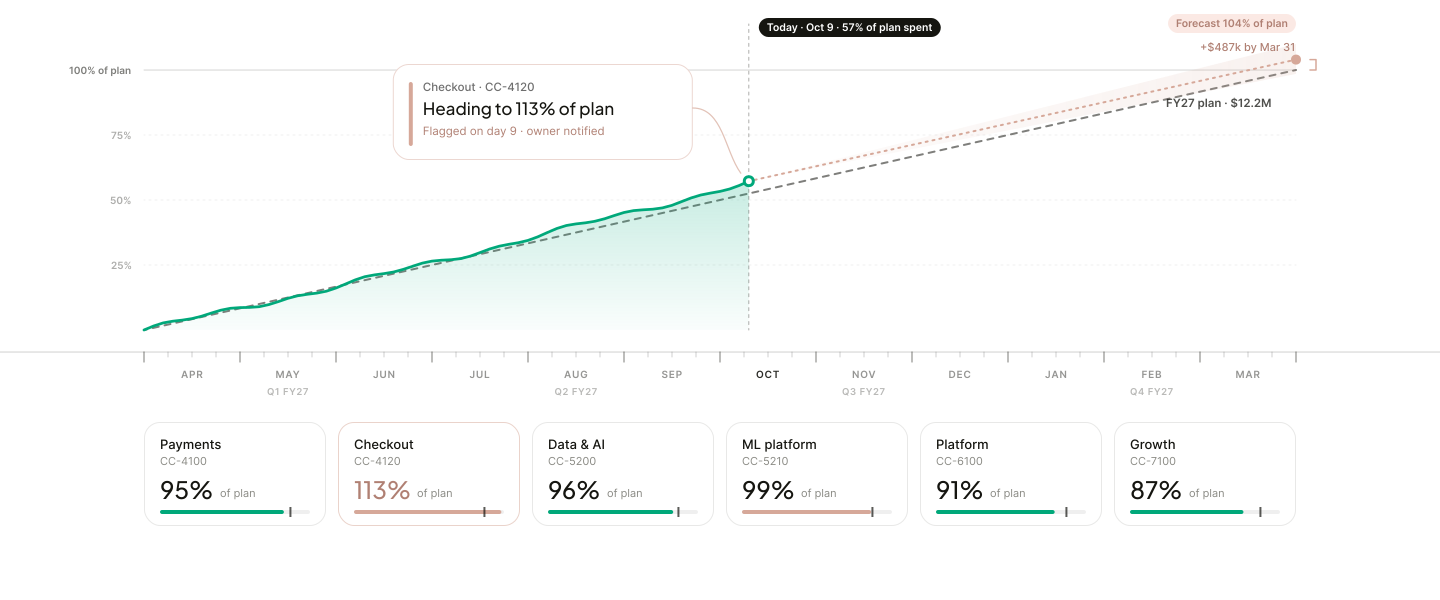
Your plan is set once a year. Your cloud bill changes every day. OneLens turns the plan into live budgets, each with an owner and a forecast, so the gap between budget and actual closes before month end, not after.
Cloud spend at 57% of plan by Oct 9, forecast to land at 104%, with the Checkout budget flagged at 113% and Six team budget tiles showing plan used, from Growth at 87% to Checkout at 113%
Trusted by finance and engineering teams at
 DTDCairpayFi Kotak Mahindra BankChalo

30%

Average cloud and AI cost reduction

36 hrs

Median time to first cost insight

$2M+

Savings identified across customers

Budgets are set once a year. Spend changes every day.

The plan goes stale in weeks

A launch, a migration or an expired commitment moves spend, and the annual number never hears about it.

Nobody owns the number

A budget on the whole account belongs to everyone, so no one explains the variance.

Finance finds out at month end

The overrun shows up on the invoice, weeks after anyone could have changed course.

Turn the annual plan into live budgets

Upload the plan as a CSV or Excel file, and each line becomes a budget that tracks real spend from day one. No plan yet? Auto Create drafts budgets from past spend, with a lookback you choose.
Annual plan from CSV or Excel turned into live daily to yearly budgets that track spend from day one

Give every budget an owner

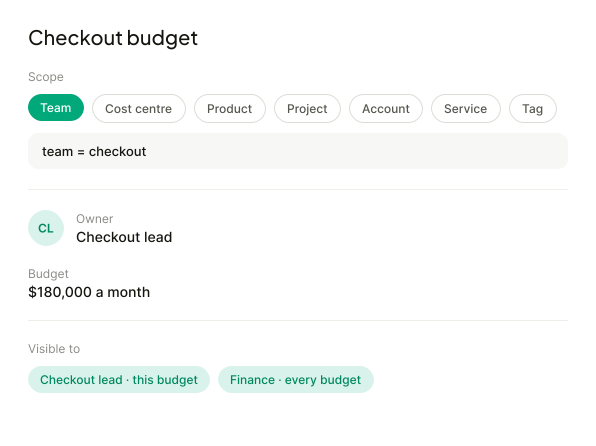
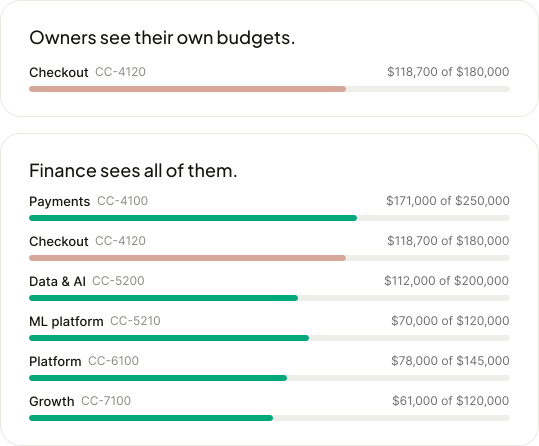
Budgets work when someone answers for them. Scope each one to a team, cost centre, product, project, account, service or tag, and name the person accountable for it.
Checkout budget scoped to a team, with an owner and a $180,000 monthly limit Owners see their own budget while finance sees all six budgets against plan

See where each budget will land

OneLens forecasts the rest of the period from run rate and seasonality. Add the changes you already know about, such as a commitment expiring, a migration or a launch, and the forecast moves with them.
Line chart forecasting $203,600 against a $180,000 budget, with commitment expiry, migration and launch marked
A forecast that earns trust
Each budget shows past forecasts next to what was actually spent, so teams see how close the forecast runs and rely on it more each month.

Flag the miss early, not at 80%

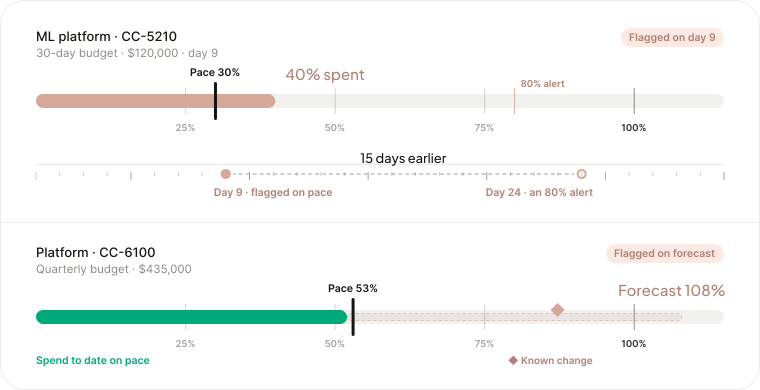
A budget is flagged the day its pace or its forecast says it will miss.

On pace

Pace compares spend with where it should be on this day of the period. A 30-day budget at 40% on day 9 is flagged that day.

On forecast

A forecast above budget is flagged even while spend to date looks fine, so slow drift and known changes surface weeks ahead.
Budget flagged on day 9 at 40% spent and forecast to hit 108%, 15 days before the 80% alert

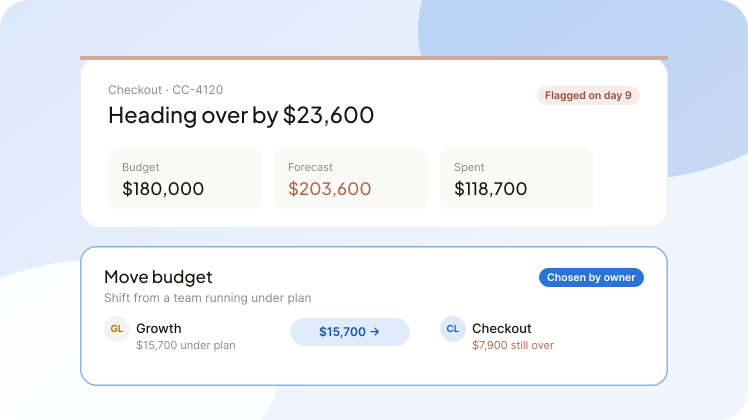
When the forecast says miss, the owner acts
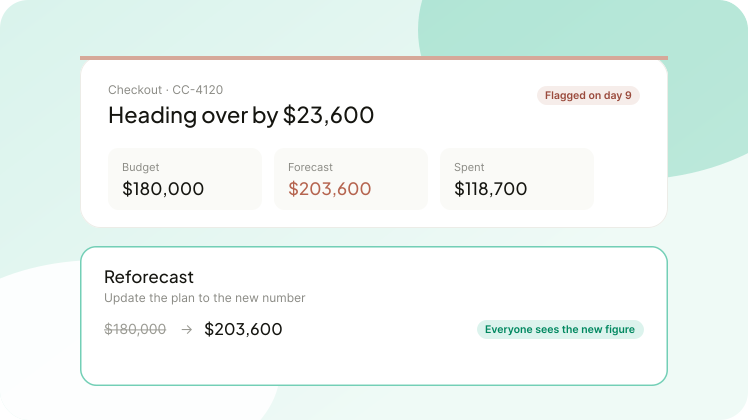
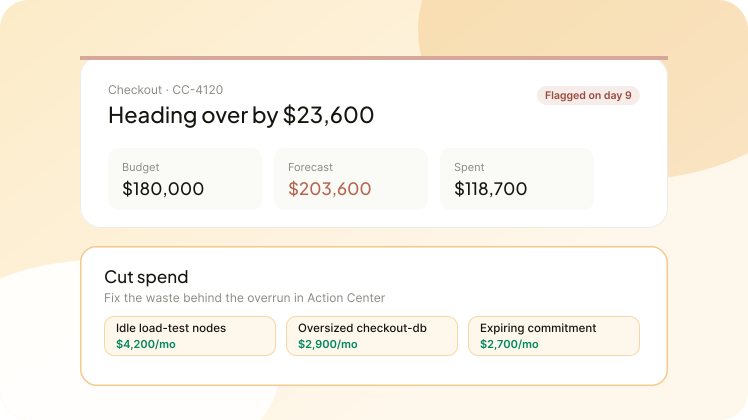
A flag starts a decision, not an email thread. The owner explains the variance, then picks the next step.
Finance sees every explanation and decision in one place, so the month-end review starts with answers.

AI spend gets a hard limit

Token use can double in a week, so AI spend can’t be forecast the way cloud can. OneLens puts a budget on each API key and caps it at the limit. Model policies and key inventory live in AI Cost Control.
 →
Chart of API key spend rising steeply, then held flat at its limit

Finance and engineering work from the same number

Finance
Loads the annual plan, watches variance by cost centre, and walks into month end with the explanations already in.
Engineering leads
See their team’s forecast against plan and fix an overrun while there is still time left in the period.

Budgets set the plan. The rest of OneLens keeps spend inside it.

Action Center

Cut the spend that pushed a budget over, not just the number.

 →

Anomalies

Catch the sudden spike a forecast never saw coming.

 →

Allocation

Decide which team owns every dollar before it lands in a budget.

 →

50+

Integrations
AWSGoogle Cloud Azure KubernetesSnowflakeOpenAIAnthropic Databricks
airpay
“
Astuto OneLens has allowed us to embed cost optimization into our day-to-day engineering workflows. It’s no longer a separate task, it’s a mindset.
Mohammed Zeeshan Shaikh
DevOps Lead, airpay
“
OneLens has greatly improved our visibility into Business to Service mapping, allowing us to track costs more accurately through dedicated cost centers.
Naveen Ale
DevOps Engineer, DTDC
DTDC
G2 rating of 4.6 out of 5
4.6 /5
G2 rating of 4.6 out of 5
Rating on G2
AICPA SOC 2ISO 27001 certified

Close the gap between budget and actual this quarter

Book a demo
What can I set a budget on?

A provider, account, region, service, team, project, cost centre, tag or saved cost report.

Can we load our annual plan on our own fiscal calendar?

Yes. Upload the plan as a CSV or Excel file and each line becomes a live budget. Periods run daily to yearly on your own fiscal dates.

Who owns a budget?

Every budget has a named owner who sees it, gets its flags and explains its variance. Finance sees every budget.

How does OneLens forecast spend?

From run rate and seasonality over a lookback you choose, adjusted for known changes such as expiring commitments, migrations and launches. Each budget shows past forecasts against actual spend, so you can see how close it runs.

When does a budget get flagged?

When its pace or its forecast says it will miss. A 30-day budget at 40% on day 9 is flagged that day, well before any 80% threshold.

What happens when a budget is going to miss?

The owner explains the variance, then reforecasts, moves budget from a team running under plan, or cuts spend through Action Center. Finance sees every decision.

Does this cover AI spend?

Yes. Each API key can have its own budget, capped at the limit. Model policies and key inventory are covered by AI Cost Control.

How are budgets different from anomaly detection?

A budget measures spend against a plan you set and flags it as actual or forecast spend heads past it. Anomaly detection looks for a break from normal patterns, which can happen with plenty of budget left. Most teams run both.