Know what drives every cost, from the total to the pod, query and token
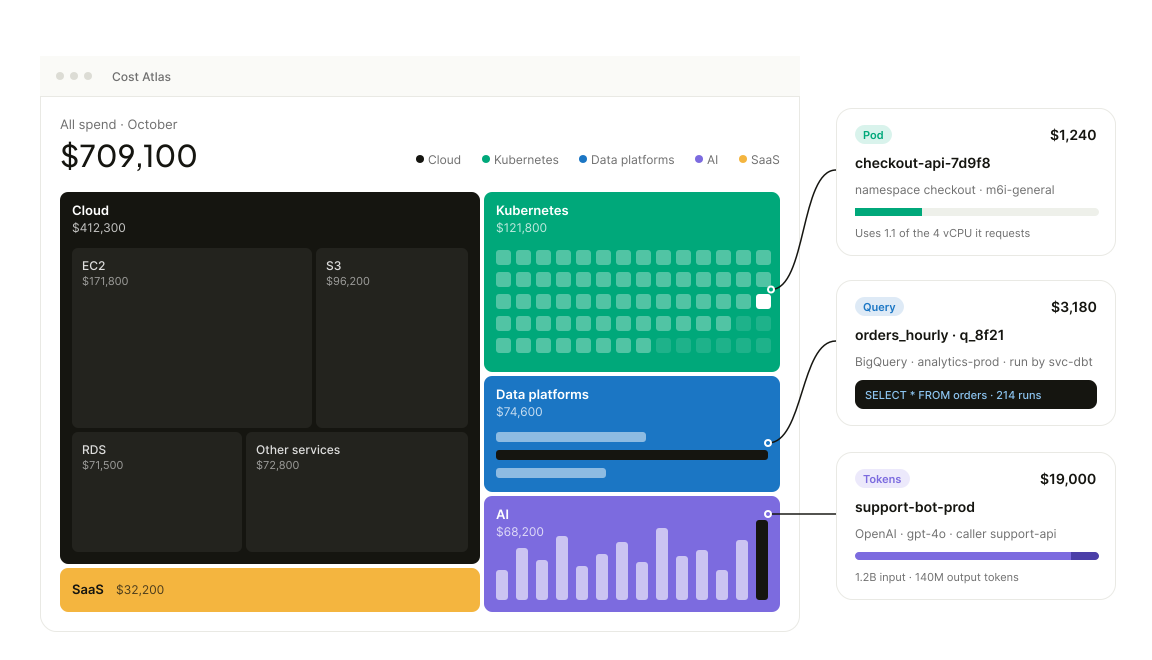
Cloud, Kubernetes, data platform, AI and SaaS costs, plus any bill you upload, come together in one view on the FOCUS standard. Click any number to see the workload, query or API key behind it.
Cost Atlas treemap of $709,100 October spend by cloud, Kubernetes, data platforms, AI and SaaS, with pod, query and token cost cards
Trusted by finance and engineering teams at
 DTDCairpayFi Kotak Mahindra BankChalo

30%

Average cloud and AI cost reduction

36 hrs

Median time to first cost insight

$2M+

Savings identified across customers

Your bill shows what you spent, not what drove it
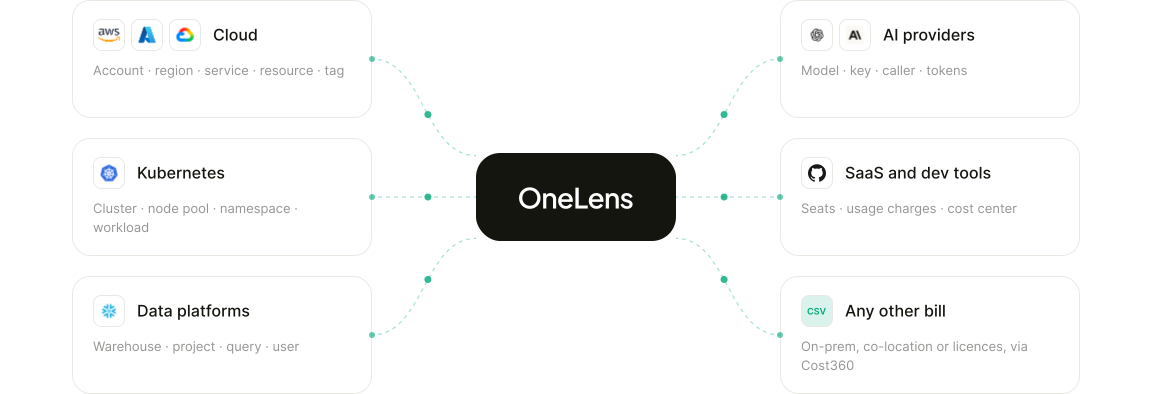
Most tools stop at the line item and miss AI. OneLens traces each source to the tag, workload, query or token behind it.
OneLens at the center linking cloud, Kubernetes, data platforms, AI providers, SaaS tools and any other bill

Ask your cost data a question in plain English
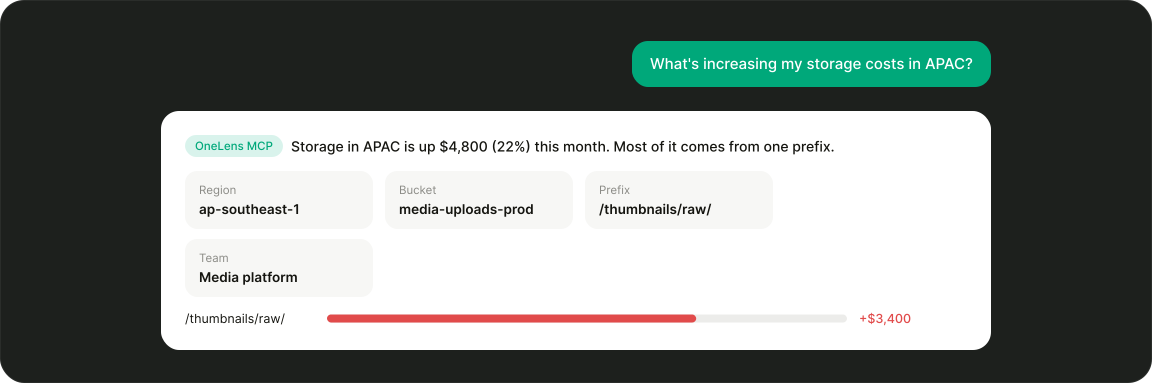
Connect your AI assistant to the OneLens MCP server and ask the way you would ask a colleague. The answer names the region, bucket, prefix and team behind the number.
AI assistant answering that APAC storage costs are up $4,800, mostly from the media-uploads-prod thumbnails prefix

Finance and engineering each get their own view
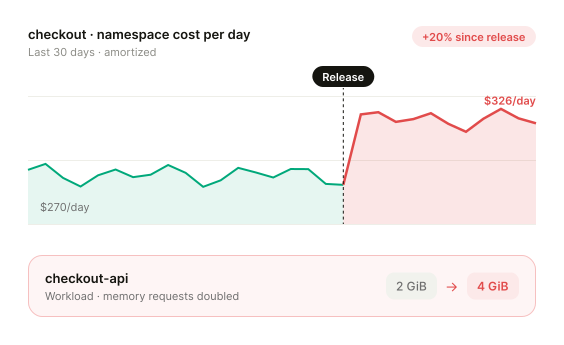
Line chart of checkout namespace cost per day rising 20% after a release, traced to doubled memory requests

For engineering

Each team opens a view scoped to its own namespaces, datasets and API keys. After a release, the checkout team sees its namespace up 20% and the workload whose memory requests doubled.
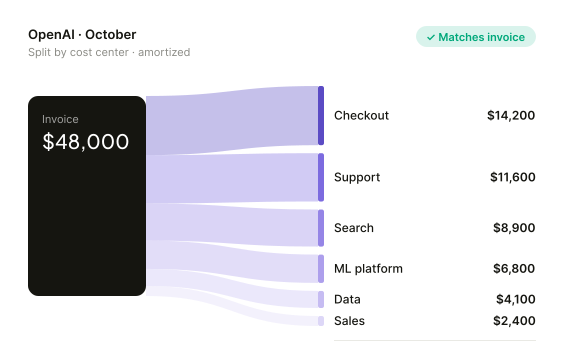
Flow diagram splitting a $48,000 OpenAI invoice across six cost centers, led by Checkout at $14,200

For finance

AI spend rolls up by cost center next to cloud and SaaS, in amortized or net cost. At month end, a $48,000 OpenAI bill splits across six cost centers and matches the invoice.

Slice, save and share any view of your spend
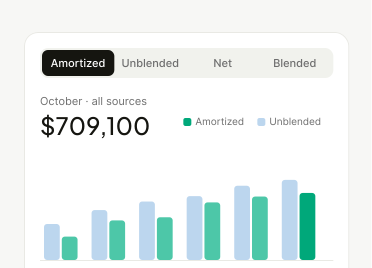
Bar chart of $709,100 October spend with Amortized, Unblended, Net and Blended toggles

Cost types

Amortized, unblended and net costs on every cloud, plus blended on AWS.
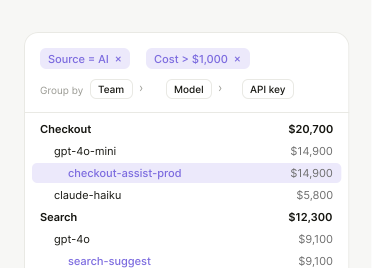
Spend grouped by team, model and API key, filtered to AI sources over $1,000

Grouping and filters

Group by up to four levels, from account and region to team, model and API key, and filter on any condition.
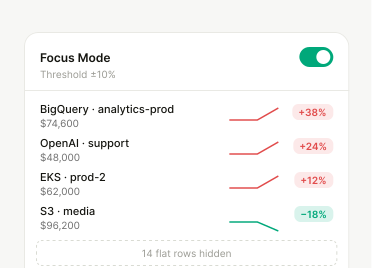
Focus Mode listing only rows that moved past 10%, such as BigQuery up 38%

Only what moved

Focus Mode hides flat rows and keeps the spend that moved past your threshold.
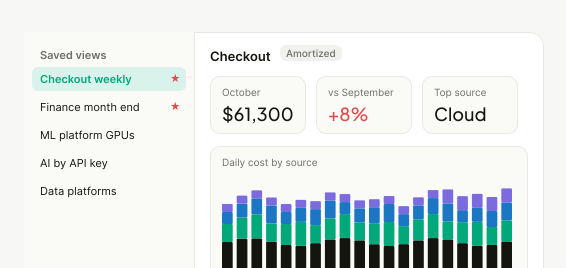
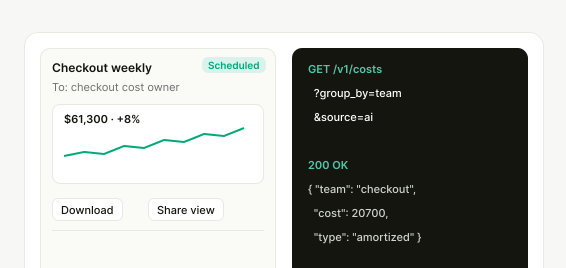
Saved Checkout weekly view showing $61,300 spend, up 8%, with a daily cost by source chart

Saved views and dashboards

Save a report once, and give each team its own dashboard and cost type.
Scheduled checkout report beside a cost API request grouped by team returning $20,700

Reports, exports and API

Send saved views to each cost owner, download as [formats], or pull data through the cost API.

Seeing the spend is step one

Once you can see what drives a cost, the rest of OneLens acts on it.
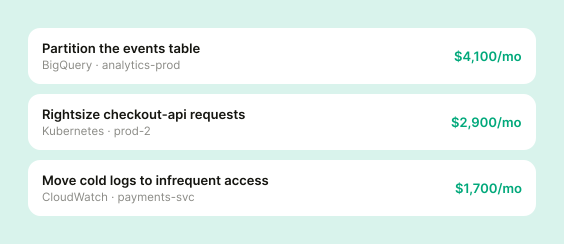
Ranked savings list, including partitioning an events table for $4,100 a month

Optimization

Find deep savings in Cloud, Kubernetes and AI
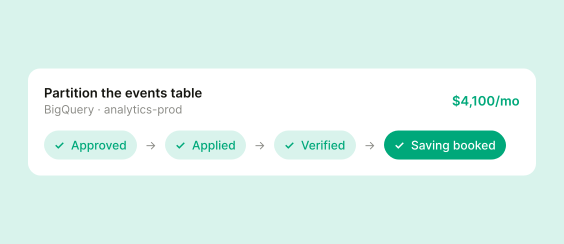
Saving moving from Approved to Applied, Verified and Saving booked

Action Center

Turn an approved finding into a change made in your own cloud.

Allocation

Give every dollar an owner, including shared and untagged spend.

AI cost control

Set budgets and guardrails on models, keys and callers.

Anomalies and budgets

Get alerted when spend moves before the invoice arrives.

Kubernetes

Split shared cluster costs by team and find idle capacity.

Enterprises trace what drives their cloud and AI costs with OneLens

50+

Integrations
AWSGoogle CloudAzureKubernetesSnowflakeOpenAIAnthropicDatabricks
airpay
“
Astuto OneLens has allowed us to embed cost optimization into our day-to-day engineering workflows. It’s no longer a separate task, it’s a mindset.
Mohammed Zeeshan Shaikh
DevOps Lead, airpay
“
OneLens has greatly improved our visibility into Business to Service mapping, allowing us to track costs more accurately through dedicated cost centers.
Naveen Ale
DevOps Engineer, DTDC
DTDC
G2 rating of 4.6 out of 5
4.6 /5
Rating on G2
AICPA SOC 2 ISO 27001 certified

See what drives your costs this week

Connect your first cloud account and see your costs within 36 hours. Add data platforms, AI, SaaS and custom sources whenever you're ready.
Book a demo
Which sources does OneLens support?

Clouds are AWS, Azure, Google Cloud and OCI, with Kubernetes on EKS, AKS and GKE, plus Snowflake and BigQuery. AI covers OpenAI, Anthropic, Amazon Bedrock, Azure AI Foundry, Google Vertex AI, Gemini Enterprise and LiteLLM. SaaS covers GitHub and Cursor. Anything else can come in through Cost360.

What is FOCUS, and which version does OneLens use?

FOCUS is the FinOps Foundation's open specification for billing data. OneLens stores all costs in FOCUS [version] columns, and adds columns for Kubernetes and AI usage. Costs from every source line up without you writing your own mapping.

Can I add costs OneLens doesn't connect to?

Yes. Cost360 takes any cost you can export, such as on-prem, colocation, licences or another SaaS tool. Send it by [ingestion methods], map the columns once, and it appears in reports, budgets and allocation like any other source.

How quickly will I see my costs?

Most customers see their first cost insights within 36 hours of connecting their cloud accounts.

How fresh is the data?

OneLens refreshes cost data [refresh frequency]. Freshness also depends on how often each provider publishes its billing export, typically [provider delay].

Can I see amortized and unblended costs?

Yes. Amortized cost spreads Savings Plans, Reserved Instances and committed use discounts over the period they cover, for finance reporting. Unblended cost shows usage as billed, for engineering. Both work across every cloud, and blended cost is also available for AWS.

Can I export my data?

Yes. Export any report as [formats], or export the full dataset in FOCUS format to [export targets].

Does OneLens see our AI prompts?

No. OneLens reads billing and usage data through read-only access. Prompts and responses never leave your environment.