Track every AI key, control what it spends, and prove what it returns
OneLens shows AI spend down to the key, model and caller. Rules act on a key the moment it breaks one, and every AI feature shows what it returns.
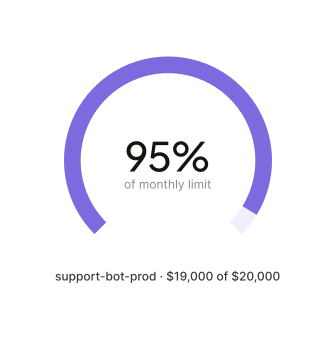
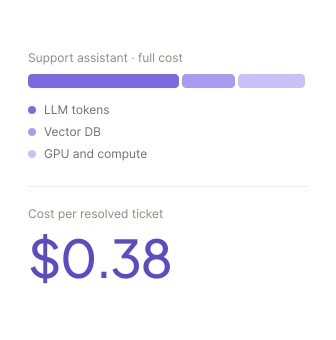
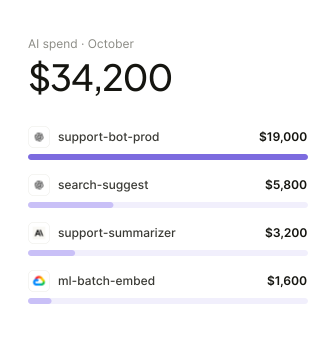
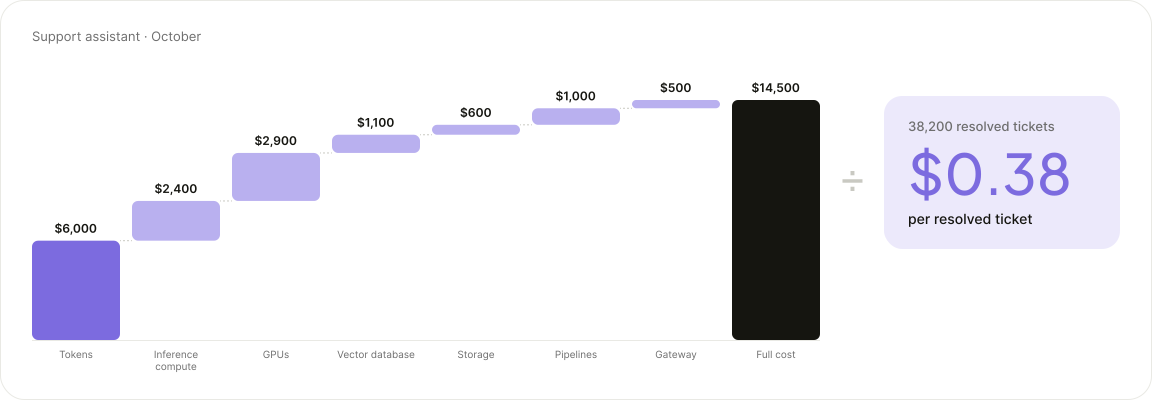
Dashboard card showing $34,200 October AI spend by key, led by support-bot-prod at $19,000 Gauge showing support-bot-prod at 95% of its $20,000 monthly limitSupport assistant cost split across LLM tokens, vector database and GPU, at $0.38 per resolved ticket
Trusted by finance and engineering teams at
 DTDCairpayFi Kotak Mahindra BankChalo

30%

Average cloud and AI cost reduction

36 hrs

Median time to first cost insight

$2M+

Savings identified across customers

See every AI dollar down to the key, model and caller
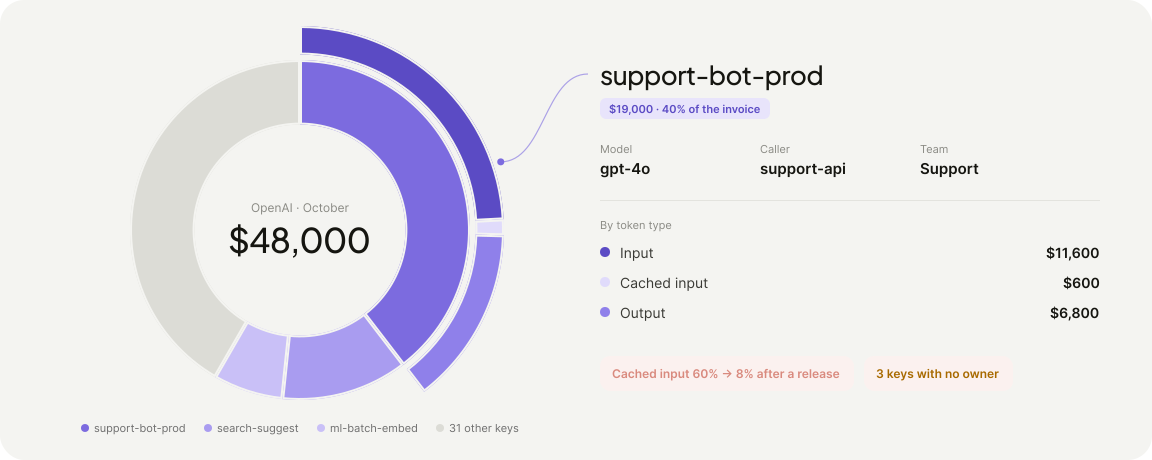
OneLens reads each line item by token type, model, caller and cache across providers and gateways, and finds keys nobody owns.
 →
Donut chart of $48,000 OpenAI spend by API key, with support-bot-prod at 40% of the invoice

Decide who can spend, how much, and what happens when a rule breaks
Every key is inventoried, given an owner and watched against its budget. When a rule breaks, an alert, a gateway limit or Action Center acts on the key, and the action is logged with a one-click rollback.
 →
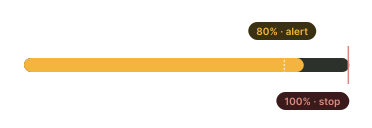
Budget bar for an API key with an alert at 80% and a spend stop at 100%

A key nears its budget

At 80% of its monthly budget the owner gets an alert, and at 100% the spend limit stops it.
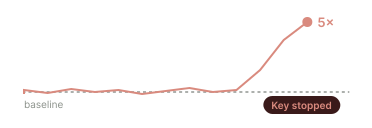
Line chart of a key's spend jumping to 5x its hourly baseline before the key is stopped

An agent runs away

When spend on a key jumps to five times its hourly baseline, OneLens pages the owner and stops the key.
Bar chart where cache hits collapse right after a release

A deploy breaks caching

When the cache hit rate drops sharply after a release, the owning team gets an alert.

Know what every AI feature costs and returns
OneLens shows when the spike started, the cost above expected so far, and the resource behind it.
 →
Waterfall chart adding tokens, GPUs, vector database and gateway into a $14,500 support assistant cost and Tile showing 38,200 resolved tickets at $0.38 each
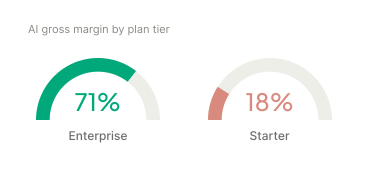
Gauges showing AI gross margin of 71% on Enterprise and 18% on Starter

For product and pricing

AI gross margin by customer and plan tier sets usage caps, AI add-ons and tier limits. Enterprise runs at 71% while Starter runs at 18%.
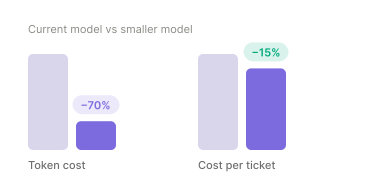
Bar chart showing a smaller model cutting token cost 70% and cost per ticket 15%

For engineering

Test a cheaper model against the outcome, not the token price. A smaller model cuts token cost 70%, while retries leave cost per ticket down 15%.
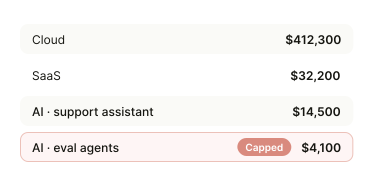
Ledger of cloud, SaaS and AI workloads, with the eval agents workload capped at $4,100

For finance

Each AI workflow sits on the same ledger as cloud and SaaS. When one stops paying off, a cap on the keys behind it holds the line.

Put the rules to work across OneLens

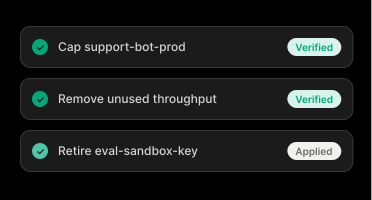
Checklist of fixes: cap support-bot-prod, remove unused throughput and retire eval-sandbox-key

Fix what the rules find

Cap a key, remove unused throughput and retire idle keys, then check each change held.
 →
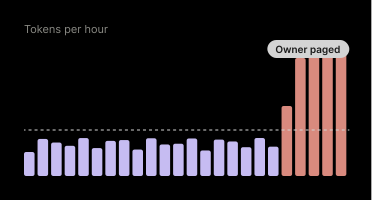
Bar chart of tokens per hour spiking above baseline until the owner is paged

Catch AI spikes in real time

Get paged the hour one key or agent starts burning tokens faster than its usual pace.
 →
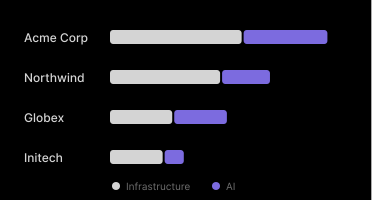
Bar chart splitting cost per customer into infrastructure and AI for Acme Corp, Northwind, Globex and Initech

Know the cost per customer

See what each customer or feature costs, with the infrastructure behind it.
 →

Enterprises control cloud and AI spend with OneLens

50+

Integrations
AWS Google CloudAzureKubernetes SnowflakeOpenAI Anthropic  Databricks
airpay
“
Astuto OneLens has allowed us to embed cost optimization into our day-to-day engineering workflows. It’s no longer a separate task, it’s a mindset.
Mohammed Zeeshan Shaikh
DevOps Lead, airpay
“
OneLens has greatly improved our visibility into Business to Service mapping, allowing us to track costs more accurately through dedicated cost centers.
Naveen Ale
DevOps Engineer, DTDC
DTDC
G2 rating of 4.6 out of 5
4.6 /5
Rating on G2
AICPA SOC 2 and ISO 27001 certified AICPA SOC 2 and ISO 27001 certified

Set your first AI spend limit this week

Connect your AI providers and see spend by team, model and key. Turn on rules once every key has an owner.
Book a demo
What does OneLens show that a provider usage page does not?

 A provider shows one bill per project. OneLens splits each line item by key, token type, model, caller and cache. It then adds the GPUs, vector stores and data pipelines behind a feature, so its full cost is one number.

How do LLM Spend Tracking, Governance & Guardrails and AI ROI fit together?

Tracking shows which key, model and caller drove each AI dollar. Guardrails turn that into rules that act on the key. AI ROI divides the full cost by what the feature delivers. Most teams start with tracking and add rules once owners are named.

Can OneLens find AI keys nobody owns?

Yes. Each key is matched to a team. A key with no named owner, or no usage for 30 days, is flagged for revocation.

Can OneLens cap spend on a single API key?

Yes. Give the key a monthly cap and the provider spend limit applies when it is reached. A caller over its token allowance can be throttled through a gateway such as LiteLLM.

What access does OneLens need?

Tracking uses read-only access. Changes to keys run in your account through a provider admin key or cloud role, writing only where you have enabled an action.

Which AI providers does OneLens support?

OneLens connects to OpenAI, Anthropic, Amazon Bedrock, Azure AI Foundry, Google Vertex AI and Gemini Enterprise, plus Snowflake Cortex AI. It also reads LiteLLM and OpenRouter as gateways, and Cursor and GitHub as developer tools.

How do I calculate cost per agent run or resolved ticket?

Connect the business metric you care about to your AI usage. OneLens divides the full cost, tokens and infrastructure, by that outcome per model, customer or feature.

Which usage metrics does OneLens track besides cost?

Tokens by type, requests, cache hit rate and cost per request, by provider, model, key, caller or user. Any of them can trigger a rule.